 AgoraVox Italia
Start a WordPress blog or create a free website in seconds. Choose from over 200 free, customizable themes. Free support from awesome humans.
http://www.imhoffpress.worpress.com
Articoli
-
Monetize Your Website with Our New Free Course
10 febbraio, di Wes Theron — News, Courses, Learn, monetization
Our new course — Monetize Your Website — helps you turn the value you’re already creating into sustainable income, using the built-in tools available on WordPress.com.
Whether you share knowledge, create content, or offer services, this course walks you through practical, beginner-friendly ways to get paid. No traditional eCommerce setup required.
The course is fully self-paced, so you can dip into individual lessons as needed or follow along from start to finish at your own pace.
What you’ll learn
Across a series of practical lessons, you’ll learn how to:
- Understand your monetization options — explore the different ways WordPress.com lets you earn, and choose approaches that fit your goals and audience.
- Accept payments with confidence — set up simple payments for products, services, or donations without building a full store.
- Offer paid content and subscriptions — use memberships and subscriber-only content to monetize your expertise.
- Create value people will pay for — package your knowledge, content, or services in a way that feels natural and worthwhile to your audience.
- Set realistic expectations — understand how monetization grows over time and how to avoid common pitfalls.
- Build a sustainable approach—choose tools and strategies that can evolve with your site and audience.
Why you should take this course
If you’re already creating something valuable, this course helps you take the next step in a way that fits your site.
You’ll learn what’s possible on WordPress.com and get practical steps you can use right away, without setting up a full commerce store or reworking your site.
More video resources to explore
If you’re new to WordPress.com or ready to keep leveling up, check out our other popular courses and video tutorials:
- Understand your monetization options — explore the different ways WordPress.com lets you earn, and choose approaches that fit your goals and audience.
-
12 Essential WordPress Plugins for 2026 (Data-Backed Picks)
9 febbraio, di Amanda Coopersmith — Tips and Tutorials, Plugins, WordPress, wordpress-com There are thousands of WordPress plugins out there. But to get started, you really only need a handful.
We pulled real usage data from WordPress.com sites to see which plugins people rely on, and we selected the ones that address core website needs. Then, I personally tested each plugin and looked at user reviews.
This guide covers the most essential WordPress plugins. These are helpful if you’re launching your first WordPress site, filling gaps in your current setup, or something in between:
- Jetpack: For all-in-one site management
- Akismet: For spam protection
- Page Optimize: For site speed
- Crowdsignal Forms: For user feedback
- WooCommerce: For e-commerce
- Gravatar Enhanced: For user profiles
- Yoast SEO: For search engine rankings
- Google Site Kit: For analytics
- WPForms Lite: For building forms
- MailPoet: For emails and newsletters
- Imagify: For image optimization
- All-in-One WP Migration: For site migration
Let’s explore each of them in detail.
1. Jetpack: Essential all-in-one site management
- Key focus: Use it for ongoing site security and maintenance.
- Price: The core features are free on all WordPress.com plans, with advanced features available on Business and above.
- Best for: Website owners who want a full solution for security, speed, growth, content, and more are the ideal users.
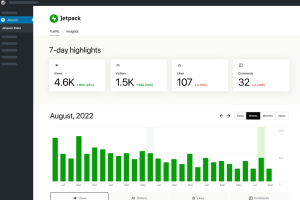
The Jetpack plugin is a comprehensive suite of tools that help launch and grow your WordPress site, which essentially replaces five or six separate plugins.
Instead of installing separate tools for backups, security, speed, and analytics, you get everything in a single dashboard.
I like that the essential features activate with one click — no digging through settings:
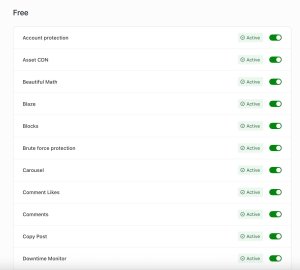
Unlike smaller plugins that can go months without updates, Jetpack is actively maintained.
You’re not left dealing with compatibility issues or security gaps when WordPress releases new versions.
Key features
- Security: It provides brute force attack protection and spam filtering on all plans, real-time backups, one-click restores, malware scanning, and WAF on Business and above.
- Performance: It offers image CDN, video hosting, and custom site search.
- Growth: It includes site stats, SEO tools with automatic XML sitemap, and social auto-posting.
- Content: It comes equipped with an AI writing assistant, forms, payment buttons, and newsletter signups.
What makes this WordPress plugin essential
If you’re new to WordPress or just don’t want to spend hours researching plugins, Jetpack covers the basics in one install — security, speed, stats, and content tools.
You can always add specialized plugins later, but Jetpack gives you a solid foundation to start.
2. Akismet: Essential for spam protection
- Key focus: Keep spam, ads, and inappropriate content out of your comment sections.
- Price: It’s free, included for all WordPress.com users.
- Best for: It’s ideal for sites that allow comments, user-generated content, and/or submissions.
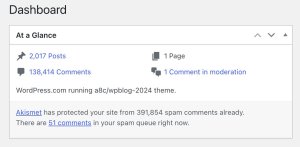
Akismet filters out over 99.99% of spam comments, form submissions, and texts, keeping your site and inbox clean.
The best part of Akismet is that you probably won’t even notice it’s there.
Occasionally, I review blocked comments, but I find it to be so good at its job that I do it more out of curiosity than necessity.
Tip: Akismet is included in Jetpack Security, so if you’re a WordPress.com user on any plan, Akismet is already installed on your site.
Key features
- AI-driven filtering: Akismet uses machine learning to determine which comments are spam and blocks them before they appear on your site.
- Analytics: The plugin tracks the total number of spam comments it has filtered and its accuracy in your admin dashboard.
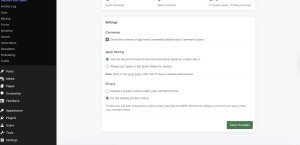
- Customizable settings: Akismet can automatically filter and delete comments (this is the setting I use) or hide questionable comments until you review and approve them.
- GDPR compliance: If you have European visitors, cover your bases with Akismet’s GDPR notice on your comment sections.
What makes this WordPress plugin essential
If your site allows comments or form submissions, spam is inevitable.
Akismet handles it in the background, so you don’t have to manually filter through junk — or worse, let it pile up and make your site look neglected.
3. Page Optimize: Essential for site speed

- Key focus: Keep your site’s code optimized for blazing fast speeds.
- Price: It’s free, included for all WordPress.com users.
- Best for: It’s ideal for non-developers who want to automatically clean up their site code and theme for optimal performance.
Page Optimize speeds up your website by removing unnecessary site code to reduce processing time.
It also optimizes which elements of your site are processed first, so users never see a blank screen.
My years of working with web developers taught me that not all code is created equal. There are many routes to the same destination, but some are more efficient than others.
With third-party themes and plugins adding extra weight, Page Optimize helps keep things clean on the backend.
Key features
- Concatenate HTML and CSS: Page Optimize strings together all of your site’s code, removing comments and unnecessary spaces for quicker processing.
- Execution timing: It also adjusts the timing of non-critical JavaScripts to either run asynchronously or at a delay.
What makes this WordPress plugin essential
Page Optimize removes unnecessary code and optimizes script timing so your pages load faster — and since it’s built into WordPress.com, there’s no setup or configuration required.
Site speed matters more than most people realize: visitors bounce when pages take too long, and search engines factor load time into rankings.
A faster site means better engagement, lower bounce rates, and more visibility in search results.
4. Crowdsignal Forms: Essential for user feedback
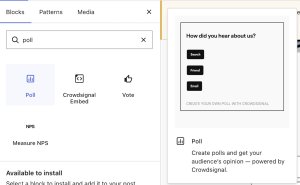
- Key focus: Embedded and pop-up user polls are the focus.
- Price: It’s free for up to 2,500 signals, and then it’s $15–$45/month.
- Best for: Get ongoing customer feedback or improve site engagement with polls.
Crowdsignal Forms is a WordPress plugin that lets you add custom polls to individual pages or as pop-ups on your website.
Polls are one of the easiest ways to boost engagement — readers can respond to your content with a single click and see how others voted.
They’re also great for collecting feedback. Unlike emails or comment boxes (where you mostly hear from unhappy people), quick polls have low friction, which means higher response rates.
For example, a recipe website could create pop-ups with simple questions like “What’s your favorite meal?” to gain real insight into its audience.

Key features
- Polls: Crowdsignal Forms lets you add multi-select and single-select polls using the Poll block.
- Customization: You can also customize your poll to match your site colors and styling for a cohesive look.
What makes this WordPress plugin essential
Crowdsignal Forms helps boost user engagement, which is a vital element of successful websites.
This plugin is a low-lift way to make your site visitors feel like their opinions are valued.
It can also provide critical information about visitors that might not be available through traditional analytics tools.
5. WooCommerce: Essential for e-commerce stores

- Key focus: Create and sell products on your WordPress website.
- Price: Use this tool for free.
- Best for: E-commerce stores, small businesses, and websites that want to sell custom merch will find it most helpful.
WooCommerce lets you turn your WordPress site into a full online store — product pages, a shopping cart, checkout, and other essentials.
And unlike selling on marketplaces like Etsy or Amazon, you don’t pay a built-in marketplace commission on each sale — though standard payment processing fees still apply.
The setup walks you through the basics, and there’s a massive ecosystem of extensions if you need extras like subscriptions, bookings, or gift cards.

Key features
- Product management: Create listings with images, pricing, categories, stock levels, variations, and custom configurations.
- Built-in shopping cart: Customers can browse, add items to cart, and check out — all without extra plugins.
- Guided setup: A step-by-step onboarding flow gets your store running in minutes.
- Massive extension ecosystem: Hundreds of add-ons are available for subscriptions, bookings, gift cards, shipping integrations, and more.
What makes this WordPress plugin essential
If you want to sell online with WordPress, WooCommerce is the standard. It’s open-source, so you own your store and data — and with thousands of extensions available, you can add pretty much any feature you need as your business grows.
6. Gravatar Enhanced: Essential for user profiles

- Key focus: It creates clickable profiles for WordPress users.
- Price: It’s free, included for all WordPress.com users.
- Best for: It’s ideal for websites with multiple contributors or large, active digital communities.
Gravatar Enhanced humanizes WordPress writers and commenters with customizable and clickable profiles.
If you write for a larger blog with multiple authors (like I do here at WordPress), your Gravatar will show up alongside your posts.
Gravatars are also used for commenting in forums and on your blog posts in the WordPress reader.
Key features
- Custom avatars: Users can upload a custom image, add a public display name and bio, and more.
- Profile blocks: The plugin lets you add profile sections to posts and pages to showcase author information, including bio, social links, and recent posts.
What makes this WordPress plugin essential
Gravatar Enhanced puts a face and bio behind every comment and post, which helps build trust and a sense of community on your site.
7. Yoast SEO: Essential for Search Engine Rankings

- Key focus: Optimize your website to improve search engine readability and rankings.
- Price: Use the standard option for free, and pay $99/year for Premium.
- Best for: Use this if you’re a website owner who wants better visibility in search results for organic traffic.
Yoast SEO optimizes your website’s content and structure to improve search engine rankings.
Some of this happens automatically — like generating XML sitemaps and adding schema markup so that search engines understand your content.
Other features work in real time as you write: Yoast flags missing meta descriptions, analyzes keyword usage, checks readability, and suggests improvements before you hit publish.
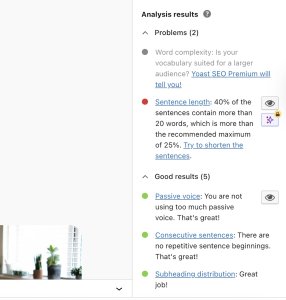
If you’re new to SEO, it’s a practical way to learn about what matters without getting lost in technical details.
Key features
- Automatic structured data and sitemaps: Yoast generates XML sitemaps and adds schema markup behind the scenes, so search engines can crawl and understand your content without you touching any code.
- Real-time SEO feedback: As you write, Yoast flags missing meta descriptions, grades your keyword usage, and suggests improvements.
- Readability analysis: Get real-time suggestions to simplify your writing, improve flow, and keep readers engaged.
Tip: If you don’t want a separate SEO plugin, WordPress.com includes built-in SEO features powered by Jetpack — including SEO titles and descriptions, sitemaps, social previews, and AI writing assistance.
What makes this WordPress plugin essential
Search is still one of the main ways people discover new websites. If your content isn’t optimized, you’re missing out on traffic.
Yoast gives you clear, actionable feedback on every page — so you can improve your rankings without needing to become an SEO expert.
8. Google Site Kit: Essential for analytics
- Key focus: Add Google’s comprehensive site analytics to your WordPress dashboard.
- Price: Use it for free.
- Best for: Try it if you’re a website owner who wants to track key metrics like site visitors and engagement inside WordPress.
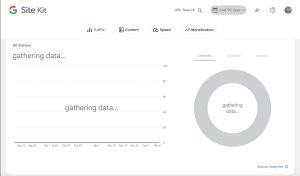
Google Site Kit is the official WordPress plugin from Google that brings multiple Google tools into one dashboard.
Instead of logging into separate accounts for Analytics, Search Console, PageSpeed Insights, and AdSense, you can see everything in one place — right inside WordPress.
You can track how people find your site through Google Search, which pages get the most traffic, how fast your pages load, and how much you’re earning from ads.
If you’re not a data person, don’t worry — the dashboards focus on the metrics that actually matter without overwhelming you with charts you’ll never use.
Key features
- One-click Google setup: Connect Google Analytics, Search Console, PageSpeed Insights, and AdSense to your WordPress site.
- Unified dashboard: See traffic, search performance, page speed, and ad earnings in one place — no need to jump between Google accounts.
- Built into WordPress: Access all your data directly from your WordPress dashboard, right where you’re already working.
What makes this WordPress plugin essential
Understanding your audience and site performance is critical for growing your website. Without this data, it’s hard to know what’s working and what isn’t.
Tip: If you don’t need the full Google toolkit, WordPress.com includes Jetpack Stats on all plans — a simpler way to track visitors, top content, and traffic sources without connecting external accounts.
9. WPForms Lite: Essential for building forms

- Key focus: Create no-code contact forms, surveys, and lead capture forms.
- Price: Use it for free, but for advanced features, upgrade to WPForms Pro, which starts at $50/year.
- Plugin rating: 4.8/5
- Best for: It’s ideal for structured data collection, like potential customer info, surveys, special event forms, and more.
WPForms Lite is a beginner-friendly form builder that lets you add professional-looking forms to your site in minutes.
Forms are useful when you need specific information from visitors, like contact details from potential customers, project specs from partners, or applications for review.
Instead of messy back-and-forth emails, you get structured submissions with the fields you need — and since forms send to your inbox without exposing your email address, you avoid spam and scraping.

Key features
- Drag-and-drop form builder: Create forms by simply dragging fields onto your form canvas — no coding required.
- Templates: Start with pre-built form templates for common use cases like contact forms, newsletter signups, and feedback surveys.
- Spam protection: Built-in anti-spam features keep junk responses out of your inbox.
- Mobile-friendly: Forms automatically adjust to look great on mobile devices.
- Email notifications: Receive instant notifications in your inbox when you have a new form submission.
What makes this WordPress plugin essential
Every website needs a way for visitors to get in touch. Forms let you control that process — you decide what information to collect, and submissions arrive organized and ready to act on.
10. MailPoet: Essential for sending emails and newsletters
- Key focus: Use for email marketing and newsletter management.
- Price: It’s free for up to 500 contacts, with paid plans starting at $10/mo.
- Best for: Use it for sending regular email communications to customers and subscribers.
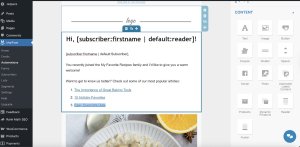
MailPoet is an email marketing platform built into WordPress. You can send newsletters, one-off campaigns, or automated emails — all without leaving your dashboard.
Because it lives inside WordPress, there’s no need to sync contacts or set up integrations with external tools. Your subscriber data and site activity are already connected.
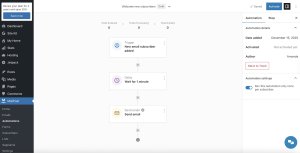
This WordPress plugin also includes signup forms, pop-ups, subscription blocks, and automated workflows that are all drag-and-drop, with no code required.
Key features
- Drag and drop email builder: Design emails, forms, popups, and more with drag and drop tools inside WordPress.
- Newsletter subscription: You can create a pop-up subscription block or banner to encourage new subscribers. Subscribers will be automatically added to the newsletter segment.
- Automated emails: The plugin also lets you send emails automatically when readers complete specific WordPress actions, like signing up for your newsletter or purchasing an item from your store.
What makes this WordPress plugin essential
Email is still one of the most direct ways to reach your audience. Regular newsletters keep your site top of mind and bring readers back, turning one-time visitors into loyal followers.
11. Imagify: Essential for image optimization
- Key focus: Automatically resize and compress images for quick website loading.
- Price: Use up to 20MB/month (~200 images) for free; paid plans are available for higher volumes — up to $10/month.
- Best for: Use for sites with photo galleries, product images, or lots of visual content.
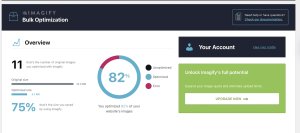
Imagify automatically compresses and optimizes images, dramatically reducing page load times. High-resolution images can significantly slow down your site, but Imagify works in the background to shrink file sizes while keeping images sharp.
I especially appreciate that it can retroactively bulk optimize existing images — you don’t need to manually compress or re-upload every photo you’ve already added to your site library.

Key features
- Bulk image optimization: The plugin compresses all existing images on your site with one click and automatically optimizes new uploads.
- Format conversion: It lets you automatically convert images to WebP format for even faster loading.
- Smart compression: You can choose from three compression levels (Normal, Aggressive, and Ultra) based on your images and quality needs. Imagify uses intelligent algorithms to reduce file size without visibly reducing image quality.
What makes this WordPress plugin essential
Oversized images are one of the main culprits for slow sites and one of the easiest things to fix. Imagify handles it automatically.
12. All-in-One WP Migration: Essential for site migration

- Key focus: Use for site migration and backups.
- Price: Use it for free (with size limits); paid extensions are available for larger sites, cloud storage, and automated backups.
- Best for: Use it to move your WordPress website from one hosting provider to another.
All-In-One WP Migration creates complete site backups that you can export and import with a single click, making it simple to move your entire WordPress site between hosts or keep a backup on hand.
I’ve used this plugin multiple times to move my personal website and client
-
Andrew Adetitun Successfully Funded His Book on African History. His Website Was the Launchpad.
6 febbraio, di WordPress.com Staff — Customer Stories, AI website builder, Website Design, WordPress, wordpress-com Andrew Adetitun runs The King’s Monologue, a media network teaching African history to over 160,000 followers across different channels.
He noticed that African history wasn’t just underrepresented — it was actively obscured. Achievements credited to the wrong civilizations. Truth buried in books most people would never read.
So he started making content. First on TikTok. Then YouTube. One video went viral — a few million views in days. The audience grew from there.
From a viral TikTok to 160,000 followers
What started as a few videos turned into something much bigger:
- 120,000+ YouTube subscribers
- 160,000+ followers across platforms
- A library of documentaries and original research
- Museum visits, trips to Egypt, academic papers

Andrew is a qualified teacher by training. He spent years teaching high school.
But his real passion was history — specifically, making African history accessible to people who’d never pick up a niche textbook.

There’s a lot of truth hidden in books. But most people aren’t book enthusiasts — they come across things in their day-to-day life. YouTube is probably the most powerful medium for reaching them.
YouTube became his classroom. Documentaries became his lesson plans. And the community that formed around The King’s Monologue became his students.
Why Andrew needed a website
Social platforms are borrowed land. Andrew knew that.
When you’re on social networks, there’s always that thing in the back of your mind — if they one day close or cancel your channel, where is everyone going to go?
He wanted a home base. A place he actually owned. Somewhere to:
- Host images from museum visits and statue reconstructions
- Publish academic papers and articles
- Build search engine visibility so his content would rank
- Support initiatives like his Kickstarter book launch
A Linktree wouldn’t cut it. He wanted control.
A former WordPress developer who didn’t have time to develop
Here’s the twist: Andrew used to be a WordPress developer. He knows how to build sites from scratch — find hosting, install WordPress, customize themes, write code.
But he didn’t have time for any of that.
Even just thinking about it was giving me a headache. Finding hosting, installing WordPress, going through all that rigmarole.
So he went the simpler route. He signed up for WordPress.com, saw the AI website builder, and gave it a try.
The structure of his new website came together in minutes. No code. No theme hunting. Just prompts and tweaks:

It was like working with a theme and being able to customize it on the fly without knowing any code.
He kept the design simple — limited colors, consistent thumbnails — and let the builder do the rest.
The website builder did most of the work. I just stuck to a strict theme for fonts and thumbnails, and it gave the whole site a professional look without me doing much at all.

What the website does today: Funding the Kickstarter and creating organic content
At the end of last year, Andrew launched a Kickstarter for his book on African history. The website was the launchpad.
I had a page set up — tkmedu.com/book-launch — and a lot of traffic came through that link, which then took people to the Kickstarter.

The campaign was successfully funded.
The website was a big part of that. It’s done its job so far.
Besides, the site is an educational resource, which includes:
- Articles and original research
- An image gallery with museum photos and reconstructions (optimized for search)
- A donation feature for supporters

From here, Andrew wants to expand. He already hired a website admin to help populate content — transcribing his videos and livestreams, editing, and posting.
Next, he plans to attract contributing authors — vetted and edited — filling the site with hundreds, eventually thousands of articles.
A searchable archive of African history that ranks in Google and serves researchers, students, and curious minds.
Your story deserves a home, too
Andrew is a former WordPress developer who chose not to build his site the hard way.
WordPress.com gave him a faster path. The AI website builder got the structure up in minutes. Managed WordPress hosting also means he’s not dealing with updates, security, or server maintenance.
He focuses on the mission. The platform handles the rest.
Andrew’s story started on TikTok. It grew on YouTube. But his website is the place he actually owns — and the launchpad for everything that comes next.
Yours can be too.
-
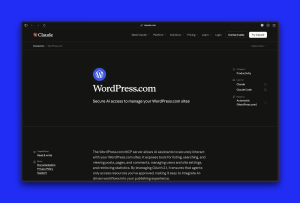
It’s official: WordPress.com has a Claude Connector
5 febbraio, di James W. LePage — News, Product Features WordPress.com has launched an official connector for Claude — the first of its kind for a WordPress host.
This means that you can now safely connect Claude to your site and know that the integration is officially supported by both Anthropic and WordPress.com.
From MCP access to an official connector
A few months ago, we introduced MCP access to let AI agents work with real WordPress.com site context — something most standalone AI tools don’t have.
With our recent addition of OAuth 2.1 support, those integrations became both more secure and easier to authorize using the agents you already rely on.
This partnership builds on that foundation by bringing WordPress.com into Claude’s connectors directory — a curated set of trusted tools with clearly defined permissions.
For WordPress.com users, this removes the setup hassle. You can connect Claude to your site in a few clicks and always see what it can access.
Let’s get connected
Ready to use the WordPress.com Claude Connector? Here’s how to get set up:
- Enable MCP on your WordPress.com account. Note that MCP access is only available for sites on paid WordPress.com plans.
- Specify which tools you want to make available to Claude. A full reference of tools can be found in our developer documentation.
- On Claude desktop or web, go to your Settings. Click Connectors, and then click the “Browse connectors” button.
- Search for “WordPress.com” and click the + button to connect.
- You’ll be prompted to log in to WordPress.com and grant secured access to your sites, thanks to OAuth 2.1.
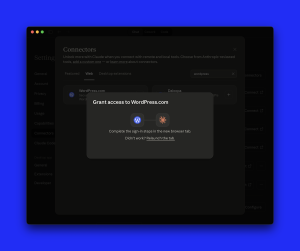
This connection gives Claude read-only access to your site content, meaning it won’t be able to create, delete, or update content. You can also revoke Claude’s access at any time by removing it from your connected apps in Claude or disabling MCP access on WordPress.com.
What this partnership unlocks for you and your site
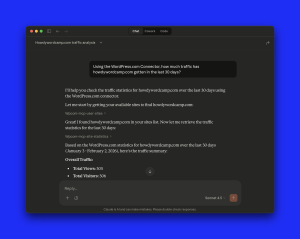
Once set up, Claude can answer questions using your real WordPress.com site data, not estimates or generic guidance.
For example:
- “Show me my site’s traffic for the last 30 days.”: Identify traffic insights for your site in just a sentence.
- “Summarize recent comments across my site.”: See what readers are responding to and where conversations are happening.
- “Which posts haven’t been updated in over a year?”: Surface content that may need refreshing based on publish and update history.
- “Show me pages with high traffic but low engagement.”: Spot opportunities for improvement using real site data.
- “Looking at my last 10 posts, generate a document reflecting my writing style.”: Create a style guide you can reference to keep your voice consistent.
- “Based on my last 10 posts and recent trends online, what should I write about next?”: Spot content gaps where your unique perspective meets current demand.
- “Read my last post and suggest resources I can link to.”: Tighten your narrative with relevant supporting articles.
- “Find posts with broken external links or outdated information.”: Keep your content credible and your readers’ trust intact by catching link rot before they do.
- “Which posts mention topics I’ve written about elsewhere but don’t link to them?”: Build internal links and surface old content to your readers.
These prompts are grounded in the same data and tools you already use in WordPress.com — they’re now all easily surfaced through the Claude interface.
For more ideas, explore the set of example prompts in our documentation.
What’s next for WordPress.com and AI?
We’re thrilled to share this partnership with you, and we encourage you to connect Claude to your WordPress.com sites today for easier site analysis and site-specific insights.
And because this connector is built and supported in partnership, it’s designed to evolve alongside both platforms.
You can connect Claude to your WordPress.com site now, explore the documentation to get started, or share feedback with us as we continue building deeper AI integrations into WordPress.com.
-
Great Writing Deserves a Spotlight: Freshly Pressed Is Back
4 febbraio, di Rob Pugh — News, Product Features, blogging, Community, Freshly Pressed, WordPress.com Reader, writing Finding your next favorite blog shouldn’t feel like scrolling through an endless feed, hoping something good appears. And for creators, getting discovered shouldn’t require figuring out an algorithm.
Back in 2009, WordPress.com launched Freshly Pressed, a curated collection of posts that entertained, enlightened, and inspired. It was our way of saying “we like you, we really like you” to creators, and amplifying their great work for others to find.
We paused Freshly Pressed a few years back, but the idea never really went away. And the case for human-curated discovery is stronger than ever.
It’s time to bring Freshly Pressed back.
What is Freshly Pressed?
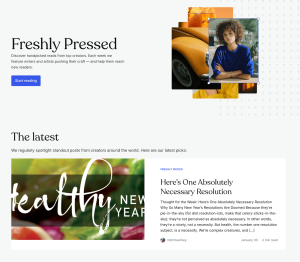
Freshly Pressed is where we highlight standout content in the WordPress.com Reader. Unlike algorithmic feeds that reward engagement metrics, Freshly Pressed features posts because they’re genuinely good. Thoughtful, well-crafted, and worth your time.
You’ll find a blogger sharing travel stories next to a hobbyist breaking down sourdough science next to a poet who just hit publish for the first time.
Where to find it
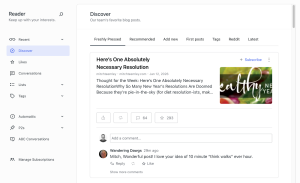
- The WordPress.com Reader: Featured posts appear in Discover with a dedicated section. This is the best way to discover Freshly Pressed alongside everything else you follow.
- Freshly Pressed webpage: Visit the Freshly Pressed page for the full collection.
- Your RSS reader: Enjoy the best of WordPress.com in your favorite RSS reader. Simply add the URL of the Discover page or the RSS feed link to your feed reader.
- Jetpack mobile app: Coming to iOS and Android in the next release. Stay tuned!

Be discovered in the Reader
Freshly Pressed lives in the WordPress.com Reader, where your post reaches readers who are actively looking for new voices to follow. When you get featured, you’ll see it — in traffic, in new subscribers, and in comments from people genuinely interested in what you have to say.
How to get featured
Want to get featured? Just keep publishing. There’s no application, no special settings to enable. If you’re on WordPress.com or use the Jetpack plugin on your WordPress site, you’re already in the running.
We’re drawn to posts that surprise us. If it made you excited to hit publish, we want to read it.
We look for posts that:
- Tell a compelling story or share a unique perspective
- Show care in the writing and presentation
- Stand out with humor, originality, or strong points of view
When your post gets featured, you’ll receive a notification and a boost of traffic and subscribers from readers actively looking for quality content.
Not publishing on WordPress.com yet? Get started for free and your next post could be the one we feature.
Discovery without the anxiety
There’s no engagement score. No trending algorithm to chase. Freshly Pressed is a slower, more deliberate kind of discovery — one that rewards the writing itself. We think that’s worth protecting.
- Ready to discover something new? Find your new favorite blog.
- Ready to be discovered? Start publishing on WordPress.com.





 RSS 2.0