 AgoraVox Italia
Start a WordPress blog or create a free website in seconds. Choose from over 200 free, customizable themes. Free support from awesome humans.
http://www.imhoffpress.worpress.com
Articoli
-
Barbara Kingsley Started TikTok at 77. Now She Has 100,000 Followers and a Website to Match.
26 marzo, di WordPress.com Staff — Customer Stories, success stories, Website Design, WordPress.com
Barbara Kingsley spent 12 years as a high school English teacher, then six more doing PR for her school district. She retired in 2018.
Then, in January 2024, she picked up her phone and started posting on TikTok.
I couldn’t contain my emotions, and out it came. I immediately found a community.
A year later, she had over 100,000 followers. Not bad for someone who describes her setup as “me and my phone.”
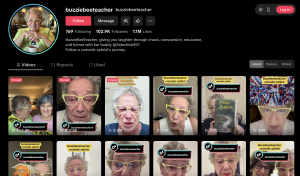
Barbara posts as Buzziebeeteacher — a nickname that’s followed her since her days as a bass player, a daycare teacher, and eventually a high school English teacher in Pennsylvania.
Her content started as political commentary and evolved into satire. She’s funny, sharp, and completely herself on camera.
What she learned about growing on social media
A year in, 100,000 followers, and Barbara has figured out what works. A few things she’d tell anyone starting out:
- Watch before you commit. See what’s working for creators you admire, then start experimenting.
- Don’t obsess over quality early on. Be consistent first. The quality will follow.
- Always tag your content with your name from day one. Barbara learned the hard way that untagged videos can be used by others — and monetized — without your knowledge.
- Pick a posting cadence you can actually maintain: starting at three videos a week makes it hard to drop to two without the algorithm penalizing you.
You’ve got to have tenacity like a bulldog hanging on to the mailman’s pant leg.
Why WordPress.com
Barbara had a WordPress.com account from years ago, set up after she retired from teaching. Life got in the way, and she forgot about it.
When TikTok took off, she came back.
She needed a place to send her followers. Somewhere she owned, where she could sell her books and build something more permanent than a social media profile.
TikTok could disappear tomorrow. Her website won’t. And having her own branded .com domain — buzziebeeteacher.com — was a big part of that.
TikTok has my whole portfolio at any moment. But my name — that’s my brand. What more can I say?

Barbara started building the site herself using the AI website builder, then discovered she could schedule a call with the WordPress.com team to get help.
I knew what I wanted, and you guys polished it off. It’s been great. If you’re thinking about buying WordPress, buy Premium — because you can schedule help at your convenience. It’s the greatest thing since soap.
What the website does today
buzziebeeteacher.com is Barbara’s hub — a place for her books, her music, her bio, and her social links. It’s where TikTok followers who want to go deeper can land.
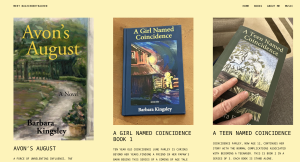
The domain was a big deal for her. It gave her brand a proper home.
That’s like MickeyMouse.com. It’s right there. It’s not going anywhere.
She’s got more plans, too. A finished cookbook written in calligraphy she wants to digitize and publish, a kids’ book, music, and videos on the site.
Your story deserves a home, too
Barbara built an audience of 100,000+ people on a platform she doesn’t control. Her website is the one place that’s truly hers.
WordPress.com gave her the domain, the platform, and the team to help her pull it together. She brought the personality and the plan.
The rest? Still being written.
-
Jetpack Social Just Got a Major Upgrade: Create, Customize, Preview, and Share with Confidence
25 marzo, di WordPress.com Staff — Product Features, Features, Jetpack Jetpack 15.6 is out, and it’s a big one for anyone using Jetpack Social to share WordPress content across social media.
We’re talking per-platform post customization, a rebuilt preview modal, improved AI image generation, and more control over what goes live and when.
Here’s everything that’s new:
Let’s explore each update in detail.
Customize your content for each social media platform
You can now customize the message, image, and formatting separately for each social platform — all from the editor sidebar before you publish.
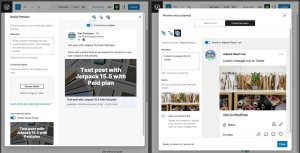
This way, your content fits the audience and format of each social media network, instead of being a one-size-fits-all compromise.
A detailed caption for LinkedIn, something shorter for X, a different image for Facebook — adjust your approach on the go.
Generate AI-powered images for your social posts
You can create more engaging images for your social posts directly in the editor using Jetpack AI.
Type a description, pick a style, and generate something that fits your post and your brand.
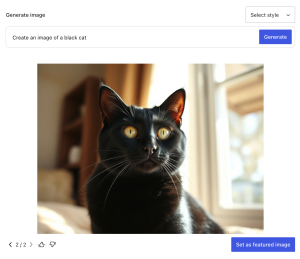
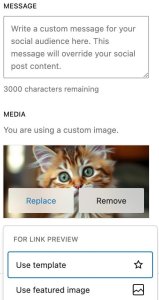
The template-based Social Image Generator is still available, too. Both options now sit alongside your media picker in a single panel.
Work with a cleaner, more intuitive sharing panel
The editor sidebar got a cleanup, too. The media picker, image templates, and AI generation now live in one unified section.
It takes fewer clicks to configure your post, the layout is cleaner, and visual dot indicators on active connections show you which accounts are enabled at a glance.
Preview your posts before they go out
The link preview modal has been completely rebuilt. It now shows you an accurate rendering of how your post will appear on each social network before anything goes out, with improved accessibility throughout.
A few things worth highlighting:
- Threads and Tumblr previews now render accurately, including gallery posts and custom messages.
- The modal is shared with Jetpack SEO, so you can preview your post for both social networks and search engines in one place.
Review what’s going out before you hit publish
Jetpack Social now gives you an optional confirmation screen before you hit publish.
It shows you exactly what’s heading to each platform so you can check the message, image, and formatting.
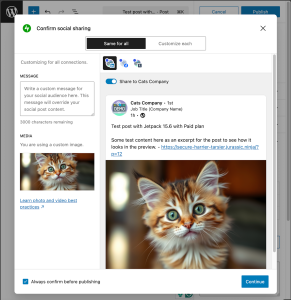
You can turn it off anytime if you prefer a faster workflow.
Check your sharing history and scheduled posts in one view
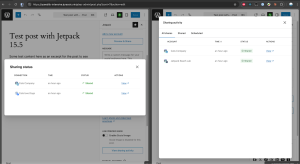
Your sharing activity and scheduled posts now live together in a single view. See what went out, what’s coming up, and when, without jumping between screens.
Try the new Jetpack Social experience
All of these improvements are already available for you to explore.
If you’re on a WordPress.com paid plan, you already have access. If you haven’t tried Jetpack Social yet, there’s never been a better time to start.
-
How Encircle Technologies Built a Smarter Agency Stack Around WordPress.com
23 marzo, di WordPress.com Staff — Customer Stories, Automattic for Agencies, success stories, wordpress-com Rahul Tulsiyani has seen the full spectrum of web development.
His agency, Encircle Technologies, runs a 50–60-person team across development, QA, and UI/UX design, based in India, building everything from custom e-commerce stores to headless CMS architectures. It serves clients through a global network of agency partners.
When you work at that scale, across that many platforms and project types, you get very good at knowing what to trust.
For most client projects, the answer is WordPress.com.
You don’t need to do any extra optimization work. Deploy to WordPress.com, and the site is fast from day one. It’s kind of amazing.
Rahul Tulsiyani, CSO & Co-Founder at Encircle TechnologiesThat’s also why Encircle joined Automattic for Agencies — WordPress.com’s program built specifically for agencies managing multiple client sites.
“We joined Automattic for Agencies as a way to streamline how we manage WordPress.com for our clients. The program makes it easy to handle multiple sites from one place — without the overhead of juggling separate accounts. For an agency working at our scale, that kind of consolidation matters. It lets us focus on building, not administering.”
The moment that changed their hosting default
It started with a client site that grew faster than anyone expected.
The site was brand new. No one was anticipating a traffic spike. But within weeks of launch, it got serious traction — and the hosting couldn’t keep up.
They upgraded the server. Then again. Then a third time, all within a few months. Each upgrade meant another bill, another conversation, another round of hoping it would hold.
Eventually, they’d had enough. They moved to WordPress.com. The traffic problem stopped being a problem.
With WordPress.com, you don’t have to worry about it. It can handle any kind of traffic you throw at it. Without extra cost.
Rahul Tulsiyani, CSO & Co-Founder at Encircle TechnologiesFewer plugins, less overhead, better sites
For a WordPress development agency, the real measure of a hosting platform isn’t just uptime. It’s how much extra work it creates — for the agency and for the client managing the site after launch.
Rahul’s rule of thumb: the fewer plugins on a site, the better it performs.
On a typical self-hosted setup, agencies end up stacking plugins just to cover the basics — caching, security, performance optimization, backups. Each one needs to be updated, tested, and monitored. And clients end up inheriting that complexity.
WordPress.com handles all of that at the platform level, so the sites Encircle deploys start leaner, run faster, and are easier for clients to manage long-term.
We don’t have to really optimize the website. It just works best.
Rahul Tulsiyani, CSO & Co-Founder at Encircle TechnologiesThat’s what a fully managed platform looks like in practice: performance, security, updates, backups, domains, SSL, and support all taken care of.
Domain transfers are also handled seamlessly — including a free 1-year extension — making client handoffs that much simpler.
AI is raising the bar, and WordPress.com helps clear it
At the same time, clients are now arriving better prepared than they used to.
AI tools have changed how people come into projects — they’ve done more research and show up with detailed, specific requirements — staging environments, CI/CD pipelines, weekly backups. They know the terminology, and they know what to ask for.
Clients used to send a few paragraphs and call it a brief. Now they come back from every conversation with ChatGPT with a new list of requirements — staging setup, Git pipeline, security practices, CDN. They know exactly what to ask for.
Rahul Tulsiyani, CSO & Co-Founder at Encircle TechnologiesThis makes having a platform that handles the defaults even more valuable. When WordPress.com takes care of security, backups, and performance out of the box, your agency can focus on what clients are actually paying for.
In a market where client demands keep growing and shifting, that’s not a small thing.
WordPress.com lets us focus on what clients actually hired us for. The infrastructure just works — and that trust adds up over time.
Rahul Tulsiyani, CSO & Co-Founder at Encircle Technologies -
Your AI agent can now create, edit, and manage content on WordPress.com
20 marzo, di Jonathan Bossenger — Changelog, News, Product Features, AI Tools Last October, we introduced MCP support on WordPress.com, giving AI agents like Claude, ChatGPT, OpenClaw, and Cursor a window into your site’s content, analytics, and settings.
Thousands of you connected your favorite AI tools, asked questions about your sites, and saved hours of dashboard diving.
But you told us you wanted more. Reading your site data was useful, but you wanted your agent to be able to actually do things for you!
That’s why we added write capabilities, turning your AI agent into your most versatile WordPress collaborator.
From reading to writing
With write capabilities, your AI agent can now:
- Draft and publish blog posts: Provide copy or describe what you want to publish, and your AI agent can create the post directly on your site.
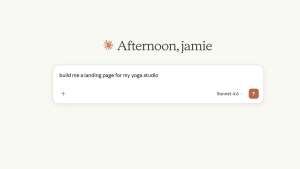
- Build and update pages: Create landing pages, About pages, and more, complete with your site’s design specs and block patterns.
- Manage comments: Approve, reply to, or clean up comments without ever opening your dashboard.
- Organize your content: Create, rename, and restructure categories and tags across your site.
- Update media metadata: Fix alt text, captions, and titles for better accessibility and SEO.
And all of this happens through natural conversation. Just tell your AI agent what you want to do, and it handles the rest.
19 new abilities, the same interface
These new capabilities add 19 new writing abilities across six content types: posts, pages, comments, categories, tags, and media. Besides enabling the new tools in your WordPress.com MCP dashboard, there’s nothing new to install to get started.
Here’s a taste of what you can do with your AI agent:
- “I just finished writing this post. Publish it as a draft, categorize it as ‘Travel,’ add relevant tags, and write me a meta description under 160 characters.”
- “I want to start publishing recipes on my blog. Set up a ‘Recipes’ category with subcategories for Breakfast, Lunch, Dinner, and Desserts.”
- “Create an About page with sections for our team, mission, and contact info.”
- “I want to add a testimonials section to my About page. Find a pattern in my theme that works for that and set it up as a draft — I’ll supply the actual quotes.”
- “Approve all the pending comments on my latest post and reply to the one asking about pricing.”
- “Add a ‘Tutorials’ category under ‘Resources’ and tag my latest three posts with ‘Beginner.'”
- “Audit my website for Accessibility and create a report.”
- “Find all images in my media library that are missing alt text and suggest some based on the filename or attachment context.”
Your AI agent discovers the available operations, figures out what’s needed, and walks you through the process — confirming every step before making changes.
Design-aware updates
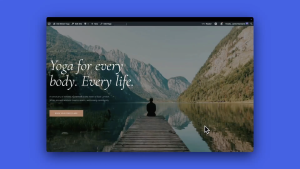
One of the most powerful aspects of the write capabilities is the integration with your site’s theme. Before creating content, your AI agent can search your theme’s design and understand its colors, fonts, spacing, and block patterns.
This results in outputs that inherits your site’s design system and adapts automatically when you change themes.
Safety you can trust
We know that giving an AI agent the ability to modify your site is a big step. That’s why we’ve built this with multiple layers of protection:
Every change requires your approval. Before creating, updating, or deleting anything, your AI agent describes exactly what it plans to do and asks for your explicit confirmation. Nothing happens without approval from you.
New posts default to drafts. When your AI agent creates a post or page, it starts as a draft, giving you a chance to review before anything goes live. If you update a published post, your agent warns you that changes will be visible immediately.
Deletion is reversible (where possible). Deleting posts, pages, comments, or media moves them to the trash, where they’re recoverable for 30 days. For categories and tags — which WordPress doesn’t support trashing — your agent explicitly warns that deletion is permanent and requires additional confirmation.
All changes are visible through your Activity Log. See all of your AI agent’s activity in your site’s dashboard (or just ask your AI agent for a list of changes it has made).
WordPress permissions are enforced. The write capabilities respect the same user role permissions as the rest of WordPress.com. An Editor can create and edit posts, but can’t change site settings. A Contributor can draft posts but can’t publish. Your existing access controls are automatically carried over.
You choose what’s enabled. Every operation, from creating posts to updating media, has its own toggle in your MCP settings. Enable only what you need on the sites you need it, and leave everything else off.
Get started
Write capabilities are available today on all WordPress.com paid plans. Here’s how to start:
- Enable MCP on your account at wordpress.com/me/mcp.
- Toggle on the write capabilities you want to use.
- Connect your AI client — Claude, Cursor, ChatGPT, or any MCP-enabled tool.
- Start creating.
For the full list of available operations and technical details, check out our MCP Tools Reference and prompt examples to spark your creativity.
When we launched MCP on WordPress.com, we said that understanding your site shouldn’t mean piecing together insights from half a dozen places. Now, managing your site shouldn’t mean it either.
Your AI agent is ready. What will you create?
-
How LUBUS Turned WordPress.com into a Competitive Advantage
19 marzo, di WordPress.com Staff — Customer Stories, success stories, WordPress.com Ajit Bohra has been building with WordPress since 2008. His agency, LUBUS, works with start-ups, enterprises, local businesses, and content platforms across India.
One decision changed how the entire agency operates: moving 80% of client projects to WordPress.com.
You work on growing the business, not in the business. WordPress.com takes care of everything else.
Ajit Bohra, Founder & CEO at LUBUSHere’s a look at the tools, workflows, and mindset behind that decision.
Why 80% of their clients run on one platform
Running everything on WordPress.com was a deliberate choice — and it shapes all operations of the agency by having one platform, one workflow, and one place to search when something goes wrong.
Backups automate, rollbacks happen in one click, and the activity log tells them exactly what went wrong and when.
The moment you go to WordPress.com, your backups are sorted. You don’t have to worry about it. Your clients are safe, your data is safe.
Ajit Bohra, Founder & CEO at LUBUSWhen a problem arises, clients can go straight to WordPress.com support without an agency in the middle. A junior team member once resolved a client site issue via chat support in 30 minutes, with no escalation and no senior help needed.
He said: I didn’t have the technical knowledge, but I got it sorted for the client. That’s exactly the point.
Ajit Bohra, Founder & CEO at LUBUSThe workflow every LUBUS developer learns on day one
Having a single platform means having a single way of working, and that consistency is what ensures a team’s efficiency across every project. Every developer at LUBUS works locally via WordPress Studio, synced to WordPress.com, so nothing directly touches the live server.
Preview links handle internal QA, and staging is for client sign-off. GitHub hosts and deploys the custom plug-ins. When something goes wrong, Jetpack backups and the activity log are the first stop — roll back, then figure out why.
We built internal documentation around it: building websites with WordPress.com. It’s what every new team member learns first.
Ajit Bohra, Founder & CEO at LUBUSPeace of mind is the real deliverable
LUBUS sets a simple goal for every project: The client’s website should keep running even without the agency’s involvement.
That means clients get hosting, SSL, automated backups, rollbacks, Jetpack features, and direct support, all bundled together.
But what Ajit keeps coming back to isn’t the feature list. It’s the fact that clients ultimately own their site, understand how it operates, and avoid panic if an error occurs.
Even without us, their WordPress is up and running. That’s our motto. WordPress.com helps us deliver that.
Ajit Bohra, Founder & CEO at LUBUSWhy AI is making the agency busier, not redundant
Their focus on genuine client value is also why Ajit isn’t worried about AI.
Four recent clients came in having already tried website building with an AI tool. They’d used it to validate their idea and create a general prototype of their vision — and then realized they needed a human to execute the concept.
For LUBUS, AI is creating a new type of client: one who arrives with a clearer brief and a stronger conviction that they need professional help.
A lot of agencies lead with tech. But tech comes after. The biggest skill is talking to real people and helping them understand what they actually need.
Ajit Bohra, Founder & CEO at LUBUSHow LUBUS uses AI internally
The team at LUBUS uses AI across copywriting, ideation, and code development.
They are experienced users of Telex, using it to build proofs-of-concept and prototype custom blocks to generate a working demo faster, which helps determine next steps.
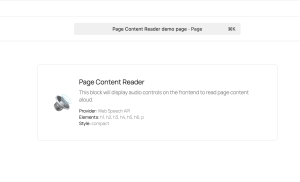
For example, the team used Telex to build a Text-to-Speech Block, exploring different implementations before moving toward a unified solution for content and accessibility use cases.
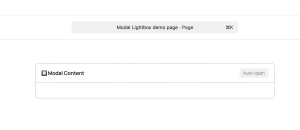
They also generated a Modal Popup Block for lightweight overlays in block-based content, which is already being used in upcoming projects and is planned to evolve into a more refined open-source solution.
But the biggest shift AI has brought to LUBUS isn’t technical — it’s commercial. Their consulting business is growing faster than their web builds, as more clients need help understanding what technology can and can’t do for them.
Build the kind of agency that wins on experience
AI is changing what clients expect from agencies, but Ajit believes the fundamentals don’t change: Understand the client, solve the real problem, and make them feel valued. WordPress.com helps companies implement this foundation.
WordPress.com has been on steroids. It evolved into an ecosystem that helps agencies work faster.
Ajit Bohra, Founder & CEO at LUBUSLUBUS has been part of that evolution since before Automattic for Agencies formally existed, and Ajit watched it grow into something much bigger than a hosting program.
Automattic for Agencies reflects that same evolution — it’s a strategic partnership that lets agencies deliver a VIP-grade experience at an accessible price point, so teams can focus on building great digital experiences.
Ajit Bohra, Founder & CEO at LUBUSGive your clients the same peace of mind LUBUS gives theirs — and provide your team the same freedom to focus on what actually grows the business.


 RSS 2.0