 AgoraVox Italia
Start a WordPress blog or create a free website in seconds. Choose from over 200 free, customizable themes. Free support from awesome humans.
http://www.imhoffpress.worpress.com
Articoli
-
New in WordPress Studio: Studio CLI on npm & phpMyAdmin Access
7 aprile, di Alexa Peduzzi — Development, News, WordPress Studio
We recently shipped two big updates for our local development tool, WordPress Studio:
- Studio CLI as a standalone npm module
- phpMyAdmin access
One is for the terminal devotee, the other is for anyone who dreads opening a separate database tool — both are for anyone who’d rather just get building.
Studio CLI on npm
Until now, using Studio meant needing to download the desktop app. That changes today.
If you work primarily in the terminal — whether you’re a Linux user or just prefer to keep your hands on the keyboard — you can now install Studio directly via npm and skip the GUI entirely.
The CLI fits naturally in automated test runs, deployment scripts, and AI coding agent workflows — anywhere you’re already working in the terminal and spinning up a WordPress site by hand would slow you down.
How to install
If you already have the Studio desktop app installed, the CLI is already available — just enable Studio CLI for terminal under Preferences.
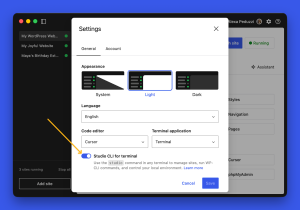
Did you notice dark mode? That’s new, too. Head to your Preferences to change your app’s appearance. If you want to install the CLI as a standalone tool, simply run
npm install -g wp-studio. Alternatively, if you just want to run it once without installing the command, runnpx wp-studio.From there, you can authenticate with WordPress.com, create and manage local sites, preview in the browser, and run WP-CLI commands. Sync with WordPress.com and Pressable, import, export, and more are on the way.
The CLI and the desktop app are companions, not competitors: you can switch between them freely and they stay in sync. And don’t worry: the desktop app isn’t going anywhere.
phpMyAdmin access
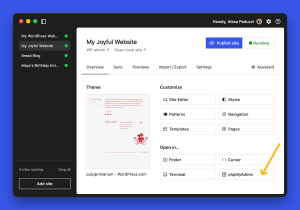
On the desktop side, Studio now includes phpMyAdmin access directly from the Overview tab, giving you a visual interface to manage your site’s database.
Inspecting or editing your local database used to mean reaching for a separate tool and going through a setup you’d rather not bother with. Now you can start querying tables, checking data, and debugging schema issues in just one click.
More ways to build locally
These two updates push Studio further in the same direction: less friction between you and building on WordPress.
The CLI removes the GUI as a requirement, and phpMyAdmin removes the need to leave the app when you need to get into your database.
If you haven’t tried WordPress Studio yet, this is a good time to start.
Questions or feedback? We’re in GitHub — open an issue to share feedback, bugs, and feature requests.
-
Plugins, Global Styles, and More: Now on Every WordPress.com Paid Plan
2 aprile, di WordPress.com Staff — News, Plugins, WordPress.com Whatever you’re building on WordPress.com — a blog, a business site, a portfolio, a store — you have everything you need to create exactly what you want. From day one.
Plugins are now available on all paid WordPress.com plans, starting with Personal. And that’s just the start.
Everything that’s now included
From now on, users on each paid WordPress.com plan can explore:
- Plugins: Access 50,000+ plugins from the WordPress Plugin Directory and extend your site with new features whenever you need them.
- Global Styles: Control your site’s fonts, colors, spacing, and visual design across every page at once.
- Font uploads: Upload your own fonts, including Google Fonts, and make your site look exactly the way you want it to.
- Custom CSS: Write your own CSS and customize your site at the code level.
Together, these tools give you professional-grade design control and the full power of the WordPress ecosystem.
What this unlocks for WordPress.com users
Site owners can now build and fully customize their sites from day one. Whatever functionality you might need to achieve your goals, you’ll find it built in.
First, make your site look and feel more like your brand. Control fonts, spacing, and layout across the whole site, or go deeper with CSS if you need something specific.
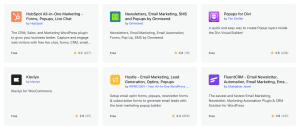
Then, start attracting more visitors and leads with plugins that add forms, bookings, and pop-ups, improve SEO, deepen analytics, and integrate with other tools.
From here, keep adding new features as you grow.
Existing customers are already in
If you’re on a current paid WordPress.com plan, there’s nothing to activate or upgrade. These features are already available on your account.
Head to the Plugins section of your dashboard and start exploring.
Already on Business or Commerce plans? You keep getting more value
You’ve always had access to the full stack — and that hasn’t changed. Business and Commerce plans include everything offered in Personal and Premium while still giving you more control, performance, and scale.
Here’s what sets your plan apart:
- Advanced SEO tools: Go beyond basic plugins with built-in SEO features and deeper insights.
- Free priority 24/7 support: Talk to a WordPress expert right away when something breaks, or you need advice.
- Staging and developer tools: Test changes before going live and manage your site directly with SFTP/SSH, WP-CLI, and GitHub.
- Eight times more storage and VideoPress: Host large media libraries and video without worrying about limits.
- Automated backups and uptime monitoring: Feel secure with built-in fallbacks that include daily backups, one-click restores, and continuous monitoring.
The Commerce plan also gives you more control over your store, with 0% transaction fees on standard payments and advanced e-commerce features fully baked in, so you don’t overpay for them.
The bottom line: The platform just got more inclusive. Your plan is still the most powerful one we offer.
Choose your path to growth with WordPress.com
You now have real design control, the full plugin ecosystem, and the flexibility to keep adding features as your site grows.
Whether you’re just starting out or overhauling your site, everything you need is already there.
-
How Consultings Company Became Brazil’s First Automattic Partner by Betting on Owned Digital
31 marzo, di WordPress.com Staff — Customer Stories, Automattic for Agencies, success stories Julia and Gianmarco Schiavi founded Consultings Company in Brazil in 2024 with a clear mission: to help businesses build complete digital ecosystems, not just pretty pages.
Social media strategy, CRM automation, brand positioning, WordPress sites — they do it all.
They’re now the first Automattic partners in Latin America and the first in Brazil.
Being an Automattic for Agencies partner allows us to deliver not just websites, but solid digital foundations for our clients. WordPress.com gives us the reliability and structure we need to build long-term digital ecosystems, not just isolated online presences.
Your website is your home. Social media is just a rental.
Julia spends a lot of time convincing clients to invest in their websites. Not because it’s a hard sell, but because the alternative is riskier than most people realize.
When you have a website, you have a strategy. It’s the start of your digital ecosystem.
She’s seen it play out firsthand. A client in Brazil was running her entire business through WhatsApp — no website, just a link in her Instagram bio. Then WhatsApp blocked her account. Everything she’d built there was gone overnight.
She lost everything that she had inside WhatsApp. After that, she finally understood why we told her to build a data center — to capture information about her followers. Because numbers are not clients.
Social media platforms are rented space. You build on someone else’s land, under someone else’s rules. A website is the one digital asset you actually own — and the foundation everything else should grow from.
You need to prepare your home before the visitors come.
WordPress.com is non-negotiable
Julia doesn’t leave hosting up to clients. Every contract Consultings Company signs requires WordPress.com.
Every client that we have — in our contracts, we say that we only build on WordPress.com, because we trust it.
That’s not a hard line for its own sake. It’s how she guarantees the work holds up.
WordPress.com gives her clients the security, support, and stability that make a website worth building in the first place. And as an official Automattic partner, it’s a platform she’s willing to put her name behind with every client she takes on.
Building for people who need it most — with Telex
At a WordPress event in Rio de Janeiro, Consultings Company entered a competition and built an accessibility tool for people who are blind or hearing-impaired.
The most curious part: they did it using Telex, entirely through prompts.
They won.
If you are programming these parts, it’s so hard. And Telex did it just with a prompt.
It’s a good example of what the platform makes possible: not just faster development, but work that would have been out of reach before.
Better tools, same human instinct
Julia uses AI tools across her work — but she’s also watching what’s happening to content because of them.
Two years ago, the trend was using everything with AI. Now, when you do something handmade, it’s more valuable. It’s not an AI thinking — it’s your idea, your way to express.
For her clients, that means the strategy behind the content matters more than ever. Anyone can generate a post. Not everyone can build a presence that connects and sticks.
That’s the work Consultings Company does — and why the website, not the feed, is always where it starts. WordPress.com is the platform they trust to make it last.
-
Top WordPress Design Trends for 2026: Interactivity, AI, and the Return to Ownership
30 marzo, di Maddy Osman — Tips and Tutorials, AI Tools, Telex, Website Design In 2026, WordPress design is shifting toward AI-assisted building, more dynamic, app-like sites, and a renewed focus on ownership.
Based on conversations with WordPress experts, a few clear shifts are already shaping how sites are built: from websites behaving more like apps to AI speeding up site creation.
To understand the WordPress design trends shaping 2026, we spoke with Allan Cole from the WordPress.com Special Projects design team, Pablo Moratinos, a WordPress.com brand ambassador, and other WordPress design experts.
1. WordPress development is moving from coding to prompting
Building a website feature used to mean opening a blank code file. Now it starts with a sentence.
AI tools generate working components, plugins, and themes — dramatically cutting setup time. Describe what you need, get a functional starting point fast, and iterate from there.
For example, Telex generates native WordPress blocks from prompts. Describe the block, refine it, download it as a plugin, and install it on your site.
As Cole puts it, “It’s great for merging design thinking with content.”
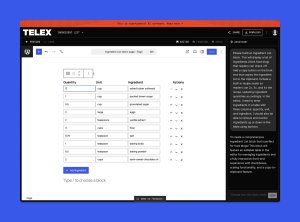
You can also go further with full plugin and theme builds.
For instance, Claude Code paired with WordPress Studio lets you generate a plugin from a prompt in plain language — no deep technical knowledge required.
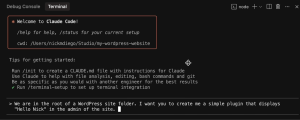
When the cost and complexity of building drops, more people can participate — and that’s where the most unexpected work comes from. The builders who combine these new tools with genuine taste and judgment are the ones who will stand out.
2. WordPress websites now behave like web apps
Most websites still work the old way: Click a link, wait for the whole page to reload. The WordPress Interactivity API changes that.
It’s a native framework that lets blocks update and communicate dynamically. So only the relevant content refreshes, not the entire page, and browsing feels instant.
The result is, as Allan Cole states, “It allows WordPress to really feel like an app in a way that I don’t think was expected before.”
For example, you can build interactive elements like tabs, accordions, or task lists that update instantly without reloading the page. This collection of demos shows what’s possible in practice.
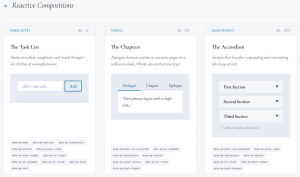
This shift shows up in a few practical ways:
- Client-side navigation: You’ll just get content updates rather than the whole page.
- Shared state: Elements such as carts and filters update instantly across the site.
- Non-blocking interactions: Users can keep browsing while content loads.
For businesses, this means lower bounce rates, better checkout experiences, and app-like UX without the expense of custom development.
3. The block editor has grown up — and agencies are noticing
Before Gutenberg, agencies depended on third-party page builders to get flexible layouts without writing code. They worked, but they added complexity, dependencies, and maintenance overhead.
That’s changed. As Cole puts it:
What’s new now is that it’s mature and that you can be much more confident building with the block editor than you were in the past.
For WordPress design agencies, the practical gains are real:
- You’ll get reusable patterns for faster building.
- Locked layouts protect the structure while allowing clients to edit content.
- It includes native typography and layout controls without custom CSS workarounds.
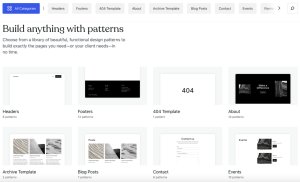
What used to require custom code now lives in the editor. As Cole says, project timelines will keep getting a lot shorter.
4. Design systems are becoming standard in WordPress workflows
Traditionally, designers created layouts individually and developers manually recreated styles in code. This process often led to inconsistencies and became harder to maintain as sites grew.
Modern WordPress design solves this by letting teams define colors, typography, spacing, and layout rules once, then reuse them everywhere.
In practice, this means setting up your design system in Figma, then exporting those decisions directly into a block theme’s theme.json file. When you open the editor, everything is already there.
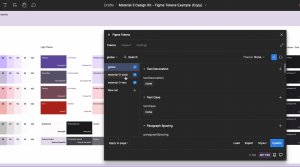
Set up design systems with Figma tokens, then connect with WordPress. As Cole puts it:
All the colors, the fonts, the sizing and spacing units — all those little subtle decisions you made in Figma are right there in the editor.
5. Getting started has never been easier — but the expertise and vision still matter
AI hasn’t replaced the need for good design. It’s removed the friction that used to stop people from trying.
The gap between having an idea and having something real to react to has collapsed.
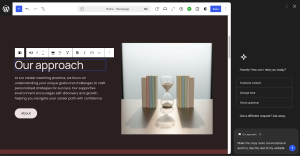
For example, WordPress.com’s AI website builder generates a full working site from a single prompt. And the AI Assistant, built into the editor, helps with content and keeps your site’s voice consistent.
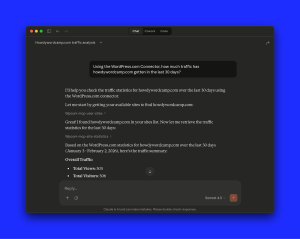
At the same time, WordPress.com’s Claude connector lets you ask questions about your site, dig into analytics, and get answers without leaving your workflow.
But what’s changed isn’t just how sites get built — it’s how clients show up. They now arrive with AI-generated references, stronger opinions, and ideas already half-formed.
The conversation has shifted from “here’s a brief” to “here’s what I’ve built — now help me take it further.”
As Ajit Bohra, Founder and CEO of LUBUS, a full-service web agency based in India and a WordPress.com user, puts it:
AI is great at helping people get a kickstart and validate their idea — they try it, realize this is something I have in my mind, and now I need a human to take this forward. When the client comes to us, they already have something built. We now have a base idea of what we’re working with.
The best results still come from humans who know what they want — AI just makes it faster to get there.
6. Owned media is a top focus (again)
The explosion of AI-generated content online has made it harder to establish trust and credibility. As social platforms become less reliable for reach and discovery, businesses are rediscovering the importance of owning their websites, audiences, and data.
As Pablo Moratinos says,
You can’t build your house on rented land.
This shift shows up in a few ways:
- Email subscribers are more valuable than follower counts.
- Organic traffic to owned domains is a priority.
- First-party data replaces dependence on platform algorithms.
In other words, websites are more than a marketing channel: They are the central hub for brand authority and audience relationships.
For designers and agencies, this defines what a successful website looks like. Sites need to be built with ownership in mind from the start: newsletter signups that convert, content that drives organic traffic, and experiences that bring people back.
WordPress website design in 2026: Next steps
The biggest opportunity now isn’t chasing every new trend. It’s adopting the workflows and tools that make sites faster, easier to design, and built to last.
A few practical places to start:
- Build with block themes and design systems so your layouts are consistent, reusable, and easy to hand off.
- Use AI to move faster on content, layouts, and prototypes — but keep your design judgment in the driver’s seat.
- Design for ownership from the start: Sites that convert visitors into subscribers and bring them back.
- Lean into interactivity and smooth experiences, because how a site feels is now as important as how it looks.
The agencies and designers who will stand out aren’t the ones using every new tool. They’re the ones who know which tools make their work sharper, and which decisions only a human can make.
-
WordPress.com Changelog: Enabling AI Agents to Work on Your Site and More Control Over Newsletter Sending
27 marzo, di WordPress.com Staff — Changelog, AI Tools, Editor, Fixes, Newsletter, WordPress.com Reader March 15–27, 2026
Welcome to the WordPress.com changelog!
We’re always working on making WordPress.com better for you — new tools, fixes, little things you might not notice but will definitely feel. We want to keep you in the loop. Every couple of weeks, we’ll share what’s changed and why it matters for your site or business.
In this edition, we’ll cover how you can now let AI agents create and manage content on your site, how to have more control over how newsletters are sent, and more.
Let’s dive in:
AI
Ask AI to handle the busywork and management on your site
You can now connect AI tools like ChatGPT, Claude, and Cursor to do more on your site — like drafting blog posts, updating image descriptions, organizing tags, or replying to comments.
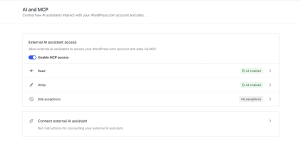
Instead of clicking through your dashboard, just ask. Get Claude or ChatGPT to work for you by asking things like:
- “I just finished writing this post. Publish it as a draft, categorize it as ‘Travel,’ add relevant tags, and write me a meta description under 160 characters.”
- “Update my About page to show our winter hours and add a notice that we’re closed December 24-25.”
- “Find all images in my media library that are missing alt text and suggest some based on the filename or attachment context.”
And most importantly: you stay in control. New posts default to drafts, deletions are recoverable for 30 days, and every action is logged. You choose exactly what AI can and can’t touch.
These features are now available on all paid WordPress.com plans. Enable them at wordpress.com/me/mcp, and check out the full announcement post for more information and example prompts you can start with today.
Newsletters
Set your newsletter send default once, not with every post
You can now set a site-wide default for whether new posts are sent to your email subscribers.
Head to Jetpack → Newsletter or Jetpack –> Settings –> Newsletter and toggle “Email new posts to subscribers by default” on or off. When it’s on, the editor defaults to sending new posts as email. Flip it on per post if you need to make exceptions.
Previously, there was no way to set this globally — you had to change the send setting manually every time you wrote a post.
As a reminder, Newsletter is a feature included on all WordPress.com sites, enabling you to send your new posts via email to subscribers without needing to use a separate tool.
Payments
WordPress.com now accepts UPI for customers in India
If you’re based in India, you can now pay for WordPress.com plans and products using UPI. No credit card needed — just pay directly from your bank account using any UPI app you already use, like Google Pay, PhonePe, or Paytm.
Editor
Editor bringing small-but-powerful updates
The editor was updated across all WordPress.com sites. Notable updates:
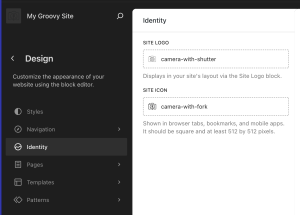
- You can now manage your site logo and icon from a dedicated screen in the Design panel.
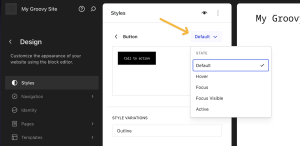
- You can preview button states — like hover, focus, and active — under Appearance → Editor → Styles → Blocks → Buttons.
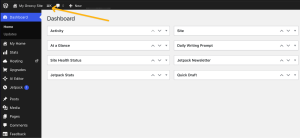
- You’ll now see a ⌘K (on Mac) or Ctrl+K (on Windows/Linux) button in the WordPress admin bar. Clicking it launches the Command Palette, which offers you a way to quickly navigate and manage your site.
Themes
Our theme showcase gets a new look
Check out the newly designed wordpress.com/themes page! It now features a cleaner layout and a more modern feel — making it easier to browse the thousands of free and premium themes we have available for you.
Fixes and improvements
We also shipped a handful of bug fixes and quality improvements across WordPress.com, including:
- Fixing featured images in the Reader being heavily cropped when viewing a full post — images now display at their natural proportions instead of being squeezed and resized.
- Fixing videos in Reader posts that were showing as an unplayable bar — they now display with playback controls and at the correct dimensions.
- Pressing the right and left arrow keys on your keyboard now allows you to navigate between posts in the Reader, alongside the existing J and K keyboard shortcuts.
- Fixing the subscriber count chart, which was making small fluctuations in subscriber numbers look much more dramatic than they are. It’s now easier to spot and understand trends at a glance.
- Fixing several bugs where domain purchases weren’t showing up correctly in your cart — including an issue where multi-year registration prices showed the wrong total before checkout.


 RSS 2.0