 AgoraVox Italia
Start a WordPress blog or create a free website in seconds. Choose from over 200 free, customizable themes. Free support from awesome humans.
http://www.imhoffpress.worpress.com
Articoli
-
Easy Site Editor – Now in Beta
21 maggio, di Glen Davies — Admin Bar
Building a website should feel exciting, not overwhelming. That’s why we’re thrilled to announce the beta launch of the Easy Site Editor on WordPress.com, a brand new way to create and customize your site through the power of conversation.
A friendlier way to edit your site
We’ve been listening closely to our community, and one thing has become clear: while WordPress offers incredibly powerful tools for those who want deep control over every pixel of their site, not everyone wants, or needs, all of that advanced functionality. Many of you just want to get your site looking great and get on with sharing your ideas, growing your business, or telling your story.
Enter the Easy Site Editor.
How it works
The Easy Site Editor reimagines website building around something everyone already knows how to do: have a conversation.
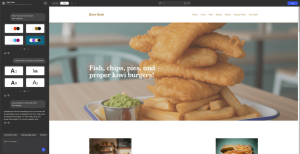
The interface is refreshingly simple. On the left, you’ll find a chat panel where you can describe what you want in plain language. On the right, you’ll see a live preview of your actual website — exactly as your visitors will see it. Want to change your homepage headline? Just ask. Need to swap out a hero image, adjust your colors, or rewrite your About page? Type it in, and watch it happen.
Because the preview shows your real, live site, you can also click around and navigate between pages just like a regular visitor would. No more wondering “where am I?” or “how do I get back to that other section?”
Quick edits without the learning curve
For those moments when you want to tweak something directly yourself, the Easy Site Editor lets you make simple text and image edits. Just select the Edit option, click on what you want to change, and update it on the spot.
The best of both worlds
The Easy Site Editor doesn’t replace the full WordPress Site Editor, it complements it. The standard WordPress Site Editor remains the powerful, advanced tool that experienced users and designers love, with its granular control over blocks, templates, and theme settings. It’s an incredible piece of software for anyone who wants to dive deep.
But if you’re someone who’d rather just describe your vision and see it come to life, the Easy Site Editor will become your starting point. And whenever you’re ready to dig into the more advanced tools, they’re just a click away.
Rolling out now
The Easy Site Editor is in beta and rolling out gradually to WordPress.com paid plans. If you have access, you’ll find it in your dashboard — look for the Easy Site Editor link in the menu. We’ll be expanding access as the beta progresses, so check back soon.
-
Easy Site Editor – Coming Soon
21 maggio, di Glen Davies — Admin Bar Building a website should feel exciting, not overwhelming. That’s why we’re thrilled to announce the beta launch of the Easy Site Editor on WordPress.com, a brand new way to create and customize your site through the power of conversation.
A friendlier way to edit your site
We’ve been listening closely to our community, and one thing has become clear: while WordPress offers incredibly powerful tools for those who want deep control over every pixel of their site, not everyone wants, or needs, all of that advanced functionality. Many of you just want to get your site looking great and get on with sharing your ideas, growing your business, or telling your story.
Enter the Easy Site Editor.
How it works
The Easy Site Editor reimagines website building around something everyone already knows how to do: have a conversation.
The interface is refreshingly simple. On the left, you’ll find a chat panel where you can describe what you want in plain language. On the right, you’ll see a live preview of your actual website — exactly as your visitors will see it. Want to change your homepage headline? Just ask. Need to swap out a hero image, adjust your colors, or rewrite your About page? Type it in, and watch it happen.
Because the preview shows your real, live site, you can also click around and navigate between pages just like a regular visitor would. No more wondering “where am I?” or “how do I get back to that other section?”
Quick edits without the learning curve
For those moments when you want to tweak something directly yourself, the Easy Site Editor lets you make simple text and image edits. Just select the Edit option, click on what you want to change, and update it on the spot.
The best of both worlds
The Easy Site Editor doesn’t replace the full WordPress Site Editor, it complements it. The standard WordPress Site Editor remains the powerful, advanced tool that experienced users and designers love, with its granular control over blocks, templates, and theme settings. It’s an incredible piece of software for anyone who wants to dive deep.
But if you’re someone who’d rather just describe your vision and see it come to life, the Easy Site Editor will become your starting point. And whenever you’re ready to dig into the more advanced tools, they’re just a click away.
Watch this space
Once the Easy Site Editor is out of beta, we will be rolling it out to all WordPress.com paid plans. Keep an eye on this blog for more details about general availability.
-
Introducing Lately, Now in Beta
20 maggio, di Andrew Spittle — News, blogging, Messaging One of the best parts of blogging is the ability to share something with the people you care most about. Over the last few weeks, we’ve built a WordPress.com feature to make that easier. It’s geared to the kind of short, casual thing you’d otherwise send in a group chat or email.
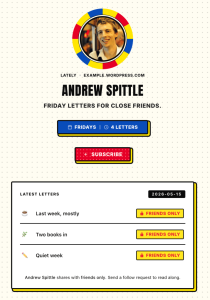
Today we’re introducing Lately, a weekly letter sent to close friends every Friday. It’s available in beta for new sites.
We’d love to hear what you think and please do send us your feedback.
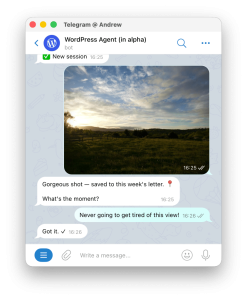
Lately lets you blog by messaging the WordPress Agent on Telegram. You send notes to it throughout the week and it captures those into a draft. Every Friday you choose what to keep, what to edit, and what to discard. Once you’re ready, Lately sends everything by email to your close friends (and only your close friends). Plus, any friends with a WordPress.com account can read your letter on the web or in the WordPress.com Reader. It’s a simpler and quieter way to blog.
Blogging simplified
There’s no software to learn with Lately. It’s as simple as sending a new message in Telegram. Just share whatever you notice to the WordPress Agent and it takes care of the rest. You get the power and freedom of WordPress with the simplicity of messaging.
Just friends
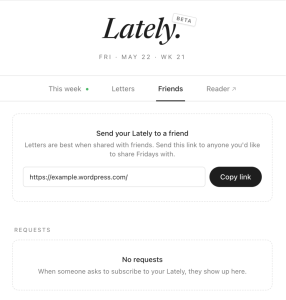
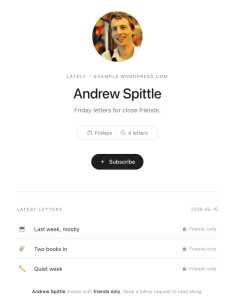
Friends are at the core of Lately and your letters are only shared with them. You can send any friend a link to your site and they’ll see an option to Subscribe. Once your friends hit “Subscribe” they’re listed in your Lately where you can approve them. Only friends you approve will receive each weekly letter you publish.
Choose your style
For anyone reading on the web, Lately ships with 3 style packs, from the understated Modern to the loud Pop. You can swap these out with the palette picker in the header. Emails all use the Modern style, but we plan to bring Pop and Zine to those email templates soon.

If you’ve been quietly meaning to share more with your friends, give the Lately beta a try today.
-
Introducing WordPress Workspace for Mac
19 maggio, di Artur Piszek — Development, Product Features, AI Tools, Apple Managing a WordPress site means switching between tools — your editor, your notes, your media library, your AI assistant. WordPress Workspace brings them together in one place on your Mac.
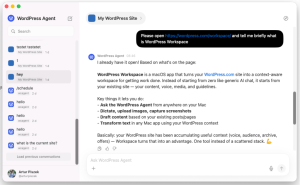
Workspace is a desktop app that gives you quick access to WordPress Agent from anywhere on your Mac. Ask questions about your site, dictate ideas, capture screenshots, upload images, and transform selected text — all without leaving your workflow or rebuilding your context.

Your WordPress site is your home base
Your WordPress site already holds more than published pages and posts. It contains your archive, your media, your audience, your offers, your style, and the shape of your work. WordPress Workspace turns that existing context into a starting point.
WordPress Workspace includes capabilities you might otherwise pay for separately:
- Quick access to WordPress Agent — Get help with your site and other tasks without opening your browser.
- Voice-to-text dictation — Turn speech into clean, usable text for posts, pages, and notes.
- Screenshot capture — Add visual context to your work without switching apps.
- Direct media uploads — Move images into your WordPress media library with a single action.
If you manage more than one site, each site can be its own workspace. Switch sites, and you switch context.
Included with your WordPress.com plan
WordPress Workspace is included with every WordPress.com plan during the beta.
There is no separate account to create, and no additional subscription to pay. Just sign in with the WordPress.com account you already use, choose the site you want to work with, and start from there.
Workspace is designed around WordPress.com accounts, sites, and permissions, so your access follows the same model your team already uses.
Guidelines (coming soon)
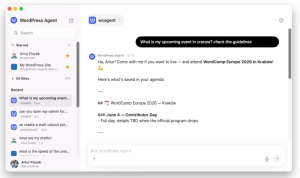
Workspace will become even more useful when paired with guidelines — a feature expected to land in WordPress Core that lets you define how content should sound, read, and behave on your site.
When available, guidelines will shape how WordPress Agent responds, how dictated text is formatted, and how generated images align with your site’s voice. This means cleaner first drafts, more consistent tone, and less manual editing.
Guidelines will introduce:
- Instructions for guiding WordPress Agent behavior specific to your site
- Memories so WordPress Agent becomes more helpful over time
- Skills to teach WordPress Agent new capabilities and share them with your team
- Artifacts for storing content in progress and general notes
Your WordPress site becomes more than the place where work is published. It becomes the place where context lives.
Workspace is one part of a broader shift toward WordPress becoming a richer environment for publishing, collaboration, and AI-assisted workflows.
WordPress Workspace: Beta availability
WordPress Workspace is in beta and included with all WordPress.com plans. During beta, features and functionality may evolve as we gather feedback and refine the experience.
System requirements: macOS 11 (Big Sur) or later. Compatible with both Intel and Apple Silicon Macs.
-
WordPress.com Changelog: AI Assistant Opt-in on All Current Paid Plans and A New Way to Build Sites from Your Terminal
8 maggio, di WordPress.com Staff April 24 – May 7, 2026
Welcome back to the WordPress.com changelog! It’s been a big two weeks at WordPress.com HQ: we opened opt-in access to the WordPress AI Assistant on all current paid plans, Studio Code launched in beta as a coding agent built specifically for WordPress, and we shipped a new theme focused on short-form social-style blogging.
AI
The AI sidebar is now on every paid plan
Until this week, the WordPress AI Assistant was opt-in only on Business and Commerce plans. Starting now, it’s available as an opt-in on all current paid plans — Personal, Premium, Business, and Commerce. Free and legacy Blogger plans will need to upgrade.
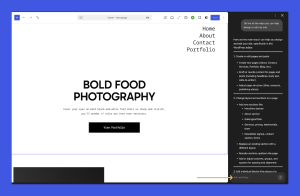
The assistant works alongside you as you write, design, and update your site on WordPress.com, offering guidance, edits, and improvements. It’s not a separate app or a one-time setup tool; it’s ongoing help that understands your specific site, built into the editor and the Media Library.
Use it to:
- Tighten your writing for SEO and clarity without losing your voice.
- Generate and edit images.
- Refine layouts and design choices without manually searching for solutions.
- Get site-aware help when something isn’t behaving the way you expect.
Here’s how to opt in, plus some tips for getting the most out of the assistant.
WordPress Studio
Build WordPress sites from your terminal with Studio Code
Calling all developers, builders, and vibe coders: Studio Code is your WordPress expert in the terminal.
Describe what you want (in natural language, with a reference URL, or with a folder of images), and the AI agent builds the blocks, theme, plugins, and full WordPress site, locally.
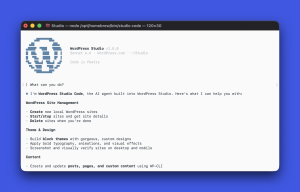
A few things it does that a generic coding agent can’t:
- Stop debugging “invalid content” warnings. Studio Code validates every block against the real editor before inserting it, so generated markup opens clean.
- Skip the screenshot-and-reprompt cycle. It captures its own output in a screenshot, spots layout issues, and iterates for you.
- Stay in the terminal to ship. Just say the word to sync to a production or staging site on WordPress.com.
- Point at problems instead of describing them. Run
/annotate, click any element on the page, and ask for the change you want.
Install the Studio CLI, run
studio code, and start describing. Studio Code is free with unlimited credits during the beta.Themes
A new theme for short-form blogging
We introduced a new short-form blogging theme that lets you create your own small, personal “micro Twitter” with a group of friends, family, or any community you choose.
It’s built for quick posts, replies, and reposts, with a simple Compose flow, profile-style pages, and automatic attribution for shared posts.

The big idea is that social-style posting no longer has to live on someone else’s platform: every update is still a real WordPress.com post on a site you control, replies are saved as comments, and the whole experience stays portable, exportable, RSS-friendly, and independent of algorithmic feeds.
Take it for a spin at wordpress.com/social.
Fixes and improvements
We’ve shipped reliability and polish updates across WordPress.com to keep your site (and the platform it runs on) running smoothly, including:
- Showing the correct duration on audio blocks in the Reader instead of always reading 0:00 before you press play.
- Routing “Contact us” links from inside support articles directly to the in-app help chat, instead of a broken landing page.
- Making BLIK, a Polish mobile payment system, a supported payment method.
- Fixing inconsistencies in how expired-domain warnings show up in the dashboard.


 RSS 2.0