 AgoraVox Italia
Start a WordPress blog or create a free website in seconds. Choose from over 200 free, customizable themes. Free support from awesome humans.
http://www.imhoffpress.worpress.com
Articoli
-
Now in the Reader: Bluesky, Mastodon, and the Fediverse
28 maggio, di Jeremy Herve — Product Features, Bluesky, Fediverse, Mastodon, reader, social
If you’ve been blogging for a while, you’ll probably know the WordPress.com Reader – a calm place to catch up on the blogs you follow, without an algorithm deciding what you see.
This month, we added a new Social Feeds section to the Reader. Now you can bring in the people you follow on Bluesky, on Mastodon, and across the Fediverse. Then read, react, and post, all without leaving the Reader.
<script src='https://v0.wordpress.com/js/next/videopress-iframe.js?m=1770107250'></script>One place to read, with more people to follow
The Reader has always been one place to catch up on writing across the open web: WordPress.com blogs, Jetpack blogs, any blog with an RSS feed. That part hasn’t changed. What’s new is the company you can keep there.
In the left navigation, you’ll find a new Social Feeds section, with entries for your connected accounts. Connected social accounts include:
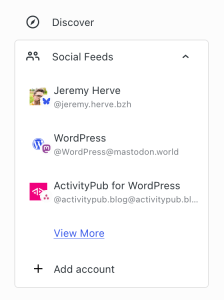
- Bluesky: and the wider ATmosphere, including Blacksky and other Bluesky‑compatible platforms.
- Mastodon: bring in your timeline from any instance, big or small.
- The Fediverse: via your own blog. If you have a WordPress.com site, you can join the Fediverse without creating a new account; your blog is your identity. Don’t have one yet? Start a blog, and you can join too. Our Social Web page is a good starting point if that’s new to you.
Pick a network, sign in once, and your timeline shows up in the Reader.
Already connected? You’re in
If you’ve ever used Jetpack Social to share your posts to Mastodon or Bluesky, those connections are already there. Open the Social Feeds section, and your accounts are waiting.
Read, react, and reply
Inside a Bluesky or Mastodon timeline, the actions are the ones you’d expect: like a post, repost it, quote it, reply to it. Same keyboard, same window, no second app.
Compose and post
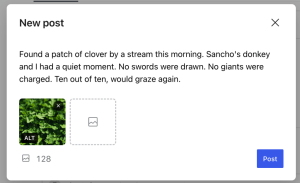
The Reader is a place to write now, too. Click Compose, type a short post, attach an image, and send it to your followers on Bluesky, Mastodon, or the Fediverse.
When a thought outgrows a social post
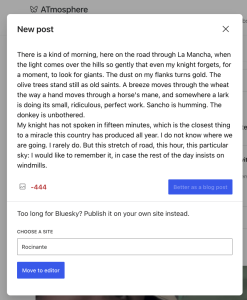
WordPress.com is a tool for creators, and we didn’t want to box you into the character limits of any one network. So when a draft starts running long for a social post, the Reader offers to hand it off to your blog. You keep writing in a fresh post draft, with all the room you need, and once you hit Publish, it reaches your followers on Bluesky, Mastodon, and the Fediverse all the same.
Try Social in the Reader
Head over to WordPress.com/reader, expand the Social Feeds group in the sidebar, and connect an account. It’s free, and the support doc walks through the details if you’d like a closer look.
If you’d like more on how WordPress.com fits into the wider Social Web, our previous posts on the Social Web Foundation and our recent ActivityPub feature update are both good follow‑on reads.
Happy reading, and happy blogging!
-
Introducing Write: A New Way to Post, Built for Writers
26 maggio, di Allison Levine 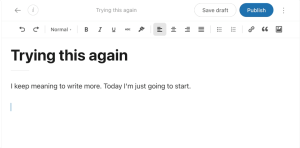
One page. A blinking cursor. The formatting you need and nothing you don’t. That’s Write: a new, focused writing surface built into WordPress.com. In last year’s Creators survey, “simplify the editor” was the single most-requested improvement from the people already publishing on WordPress.com. So we built it.
Write started as a plugin by Jamie Marsland, who asked a deceptively simple question: what would WordPress look like if it were designed purely for writers? We loved the answer enough that we brought the plugin into WordPress.com and built on it.
The interface is intentionally minimal: a clean page, a persistent top toolbar with the essentials, and formatting that appears when you need it and gets out of the way when you don’t.
<script src='https://v0.wordpress.com/js/next/videopress-iframe.js?m=1770107250'></script>Your Write posts are real WordPress posts. They live alongside your other posts, work with your theme, and you can open them in the block editor.
Write is in beta and ready to try (see our support article for setup details). The core writing experience is solid, but we’re still building, and we’d love your input on what to add next.
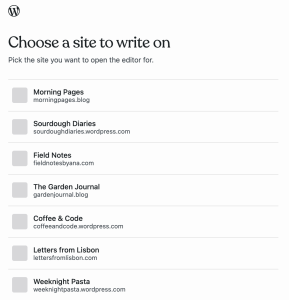
Ready to write? Head to wordpress.com/write-editor, pick a site, and start. Tell us what you think in the comments.
Co-authored by Kim Brown.
-
WordPress 7.0 Has Arrived: Here’s Everything You Need to Know
26 maggio, di WordPress.com Staff — Admin Bar, News WordPress 7.0 “Armstrong” has landed. This major release makes WordPress more connected and easier to shape around the way you work.
WordPress 7.0 includes both immediate editor improvements and deeper foundational changes. Some improvements are visible right away, like visual revisions, responsive controls, and a cleaner dashboard. Others work behind the scenes are more foundational, giving plugins, tools, and AI services a more consistent way to work with WordPress over time.
The result: A release that makes everyday site work smoother and opens the door to optional AI tools that actually feel a part of WordPress.
For a deeper technical look, check out the WordPress 7.0 Source of Truth.
What’s new in WordPress 7.0
WordPress 7.0 brings updates across AI, editing, design, performance, accessibility, and developer tooling. These changes affect how you build, update, and manage your sites.
WordPress 7.0 updates include:
- AI foundations: The AI Client, Connectors API, and Connectors screen give WordPress a more consistent way to connect with AI providers and external services.
- Editing and admin improvements: Visual revisions, a refreshed dashboard, smoother transitions, Command Palette access, and broader font management make everyday site work clearer.
- Flexible design controls: Custom navigation overlays, responsive block visibility, and pattern editing make it easier to shape pages without adding workarounds.
- New and improved blocks: Breadcrumbs, Icons, gallery lightbox improvements, Heading block updates, and block-level styling controls bring more practical tools into the editor.
- Performance, accessibility, and developer updates: Under-the-hood improvements support faster loading, better editor stability, stronger accessibility, and more consistent foundations for plugins and custom builds.
Building a foundation for AI workflows
WordPress 7.0 introduces a new shared AI layer designed to make AI tools feel more native across WordPress.
Instead of every plugin building its own separate AI setup, WordPress now includes a common system for connecting tools and services. Plugins can communicate with AI models such as Claude, ChatGPT, and Gemini through the new AI Client. The Connectors screen provides site owners with a single place to manage those integrations.
Note: These AI features are optional and need to be enabled by the site owner. Nothing is automatically shared with AI services when WordPress 7.0 is installed.
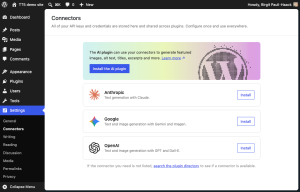
The optional AI plugin already brings features like title and excerpt generation, image generation and editing, and suggested alt text directly into the editor. As more plugins build on the same system, AI tools across WordPress become easier to use, manage, and extend.
On WordPress.com, this builds on AI tools already available across the platform, including the AI Assistant, Claude connections, and WordPress Studio workflows.
Want to understand how this all fits together? Take a closer look at how WordPress 7.0 is building the foundation for AI-powered sites.
Creative freedom inside the editor
Visual revisions make it easier to understand changes in a post or page. Instead of scanning a dense comparison view, you can review revision history with visual markers, navigate versions, and restore the one you want with greater confidence.
The dashboard also feels more modern and cohesive. WordPress 7.0 introduces a new default admin color scheme, smoother screen transitions, and a Command Palette shortcut in the top admin bar for faster access to tools.
Font management is also easier. The Font Library now works across block, hybrid, and classic themes, giving more sites one place to browse, install, upload, and manage fonts.
A new canvas for every screen
Designing for mobile used to mean making compromises. WordPress 7.0 changes that with a dedicated canvas for navigation overlays, responsive block visibility, and simpler pattern editing.
Navigation overlays now have their own editing canvas, allowing mobile menus to go beyond a simple list of links. You can start with a template or build your own overlay with blocks, columns, typography, and custom close buttons.
Responsive block visibility lets you choose which blocks appear on desktop, tablet, or mobile. That makes it easier to create cleaner layouts for different devices while keeping alternate versions available as you iterate.
Patterns are also simpler to update. A pattern can behave like a single block, so you can swap text and images or adjust styles without digging through every nested block. Advanced controls are still available when you need them.
<script src='https://v0.wordpress.com/js/next/videopress-iframe.js?m=1770107250'></script>Flexible design tools for richer layouts
WordPress 7.0 brings more practical control into the editor, making it easier to shape pages without relying on extra tools for every small design need.
The new Breadcrumbs block helps visitors understand where they are on a site, while the Icon block adds simple visual cues from a built-in library. Gallery lightbox improvements make image browsing smoother, and Heading block updates make it easier to work with page structure.
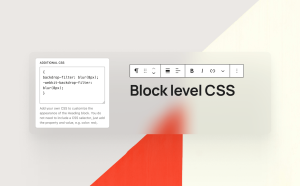
The same idea carries through to layout and styling. Responsive block visibility lets you choose which content appears on different screen sizes, while block-level CSS gives more control over individual blocks when a page needs a custom touch.
Taken together, these updates make WordPress feel more flexible in the places site owners work most: building pages, refining layouts, and helping visitors move through a site more easily.
A stronger platform for WordPress development
WordPress 7.0 provides developers with a more consistent foundation for building plugins, blocks, patterns, and site-editing experiences.
The release includes expanded APIs, PHP-only block registration, a more extensible Site Editor, and routing improvements that make it easier for plugins to build custom Site Editor pages.
These updates will not be visible to every site owner on day one, but they matter because they shape what WordPress developers can build next. Better foundations mean better tools, workflows, and site experiences over time.
Built by the WordPress community
WordPress 7.0 is a reminder of how open source software keeps evolving through shared contribution. The release reflects work from more than 875 contributors around the world. That community work is part of what makes WordPress different.
WordPress 7.0: Fully Managed on WordPress.com
WordPress.com is here to bring the best of every new WordPress release to you fast and without the setup.
WordPress 7.0 is no different. The new AI foundations build on tools already live across the platform, including the AI Assistant, Claude connections, and Studio workflows.
And on select plans, real-time collaboration is already available, letting teams work on the same site simultaneously, before it’s widely available elsewhere.
All of it backed by the security, performance, and support that comes with a fully managed platform.
You bring the vision. We handle everything else.
-
Meet WordCamp Agent: A Preview of the WordPress Memory Layer
26 maggio, di Artur Piszek — Development, News, WordCamp, WordCamp Europe, WordPress Core If you’re heading to WordCamp Europe 2026 in Kraków or just want to see where agentic WordPress is going — open Telegram and message @wordcamp_agent_bot.
WordCamp Agent is a free Telegram assistant for WCEU attendees. It plans your trip, browses the schedule, remembers which sessions you care about, and pings you before they start.
All you need is a WordPress.com free account to get started. And once you’re in, you’ll also get a preview of something more interesting: a working preview of WordPress Guidelines, the agent-context system shipping in Gutenberg and on its way to WordPress Core. It’s also the easiest way to see Guidelines working end-to-end in a real production environment.
Message WordCamp Agent on Telegram
How WordCamp Agent is built
The agent lives on Telegram and is bound to a regular WordPress site at wcagent.wordpress.com. When you message it for the first time, you’re added as a contributor on that site — your conversation, preferences, and notes become real WordPress content, stored against your user, private to your account, and deletable at any time
In one chat, you can:
- Ask for travel tips for Kraków and get accurate answers.
- Browse the live conference schedule.
- Tell it which sessions interest you, who you want to meet, or what accessibility needs you have. It remembers, across sessions and devices.
- Save notes during talks that you can turn into a post or a recap.
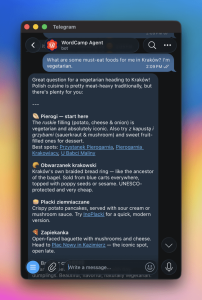
None of that required custom application code. Every behavior — the personality, the schedule lookup, the memory of your preferences — is a published Guideline on the WordPress site behind the bot. If you can publish a post, you can extend the agent.
WordPress Guidelines: The system under the hood
WordPress Guidelines stores four kinds of agent-facing knowledge as standard WordPress content:
- Instructions: Site-wide guidance that shapes how an agent behaves. WordCamp Agent uses these for its personality and core event knowledge.
- Skills: Reusable capabilities. The live schedule and venue lookups are skills. Swap the skill, change the agent’s behavior — no code change.
- Memory: Facts the agent accumulates while working with you. Your session interests, dietary preferences, networking goals.
- Artifacts: Work-in-progress. Notes, drafts, fragments you’ll come back to.
All four are represented as a single
wp_guidelinecustom post type, classified by awp_guideline_typetaxonomy. They use WordPress’s existing roles and capabilities, and they’re accessible via standard REST endpoints.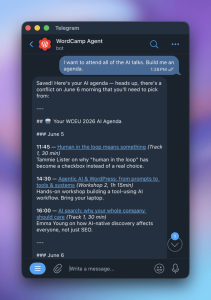
What this looks like for developers
Guidelines reuse primitives and conventions you already know:
- A single wp_guideline custom post type
- wp_guideline_type taxonomy for distinguishing between instructions, skills, artifacts and memories
- Native post revisions for versioning
- Capability-based access control: administrators see everything; contributors, authors, and editors get read/edit on their own private guidelines; subscribers are blocked at the post-type level
For a deeper technical walkthrough of Guidelines, take a look at Grzegorz’s post.
Coming to WordPress Core: Guidelines
Guidelines shipped in Gutenberg 23.2.2 and is already powering WordPress Agent, WordPress Workspace, Desktop Mode, Lately, PushMD, and WordCamp Agent itself.
The next step is WordPress Core.
We’re proposing it as a Core API because the alternative — every plugin shipping its own memory store, its own permissions model, its own REST surface — is exactly the kind of fragmentation WordPress has historically avoided.
Putting Guidelines in Core means every WordPress site, hosted anywhere, becomes agent-ready by default.
Try WordCamp Agent
The single best way to understand Guidelines is to use a site that’s already built on it. Ask it to plan your Kraków trip. Tell it what sessions you care about. Come back tomorrow and watch it remember.
-
Turn Your Blog Posts Into Podcast Episodes
22 maggio, di Miguel Torres — News, Podcast, Product Features, podcastingSome readers love settling in with a post. Others catch up while walking, commuting, cooking, or working through a long list of tabs.
Posts to Podcast gives your audience another way to keep up with what you publish.
Starting today, WordPress.com bloggers can turn recent posts into AI-generated podcast episodes directly from their dashboard. Choose the posts you want to include, generate a two-host audio conversation, review the draft, and publish it when you’re ready.
Find it in your dashboard
You’ll find Posts to Podcast under Media -> Create AI Podcast in your WordPress.com dashboard. Choose a time range, such as the last week or month, or select specific posts yourself.
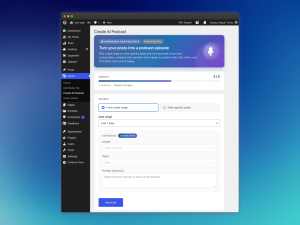
Media -> Create AI Podcast in the WordPress.com dashboard. The episode below was generated from recent WordPress.com blog posts using the same feature we’re announcing today:
How it works
Posts to Podcast turns the posts you select into a two-host audio conversation. The finished episode is saved to your Media Library, and WordPress.com prepares a draft post with the audio and transcript already included.
From there, you stay in control: review the draft, make any edits you want, and publish it like any other post. Since the audio is saved to your Media Library, you can also reuse it elsewhere, upload it to another platform, or keep it as part of your site’s media archive.
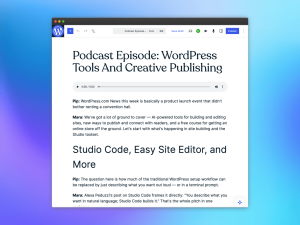
Generated draft post with the podcast episode and transcript. More ways to share your posts
Use Posts to Podcast to create weekly recaps, monthly digests, audio companions to newsletters, or listening-friendly versions of recent posts.
- Summarize your latest posts for subscribers who prefer listening.
- Turn a month of updates into a conversational recap.
- Share an audio companion to a newsletter, publication, or personal blog.
- Make your archive easier to revisit in a new format.
Available to all WordPress.com sites
Posts to Podcast is available to all WordPress.com sites. Whether you publish daily updates, weekly essays, tutorials, newsletters, or personal reflections, you can turn recent posts into a listenable episode directly from your dashboard.
A new format for your writing
Your words do the work. Posts to Podcast gives them a microphone.
Open your dashboard, go to Media -> Create AI Podcast, and turn your recent writing into something your audience can listen to.


 RSS 2.0