 AgoraVox Italia
Start a WordPress blog or create a free website in seconds. Choose from over 200 free, customizable themes. Free support from awesome humans.
http://www.imhoffpress.worpress.com
Articoli
-
How Knockers Design Builds Complex Client Work on WordPress.com
13 aprile, di WordPress.com Staff — Customer Stories, Automattic for Agencies, success stories, WordPress.com
Calvin Ho has been building websites for over a decade. His agency, Knockers Design, is based in Taipei and works with clients across Taiwan and the US, specializing in complex, custom builds.
For all of it, his platform of choice is WordPress.com.
Creating complex WordPress websites is still in high demand, and today’s WordPress.com supports us and has our back.
Built for customization, not just simplicity
Knockers Design’s projects involve CRM integrations, custom plugins, Web3 projects, API connections, and complex e-commerce setups. The kind of work where platform limitations become real problems fast.
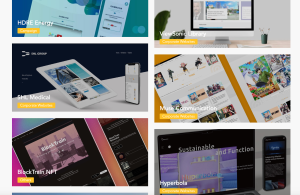
WordPress.com handles it all.
The plugin ecosystem is robust, documentation is solid, and GitHub integration makes deployment clean and reliable. For a team that codes custom solutions daily, those details matter.
There’s nothing that we can’t really do. If you have the budget, we can do it.
The real cost of self-hosting
For a long time, hosting client sites on their own servers looked like the smarter business move — more control, better margins.
But the math changes when you account for what it actually takes to run it well.
If you look at all the time dealing with backups, security issues, all those systems — it’s not actually as beneficial as working with a managed hosting provider like WordPress.com.
With WordPress.com handling the infrastructure, Knockers Design’s team focuses on the work clients actually hire them for.
How they work day to day
Calvin’s team uses WordPress Studio for local development, GitHub for deployments, and Jetpack for site monitoring — catching issues like domain expirations before clients even notice.
We get those notifications before our clients do. That way, we’re always the first to know — and the first to act.
That kind of proactive visibility is the difference between an agency that reacts and one that leads.
Trust built through community
Knockers Design didn’t find WordPress.com through a product page. They found it through people.
Calvin and his team are deeply embedded in the WordPress community in Taiwan — organizing meetups and building relationships with developers and Automattic employees over the years.
We organize meetups, we go to WordCamps, we work with people across the ecosystem. That itself is how we thrive here in Taiwan.
That trust is also how they sell. Pricing is transparent, clients can research it themselves, and WordPress.com’s reputation does a lot of the work upfront.
We’re using the best, we’re using the industry standard — that helps make our clients feel safe.
AI is raising the bar — and Knockers is ready for it
The clients walking through Knockers Design’s door today are different from the ones from five years ago.
AI tools have changed how business owners come into projects. They’ve researched their requirements, stress-tested ideas with ChatGPT, and arrive with detailed briefs — specific features, technical standards, and design expectations. The knowledge gap between client and agency is narrowing fast.
It’s becoming more of a conversation between equals — I have this knowledge, you have this knowledge, let’s figure out what we can build together.
For an agency that thrives on complex, custom work, that’s not a threat. It’s a filter.
The clients who show up with harder problems are exactly the ones Knockers Design is built to serve. Having WordPress.com handle the infrastructure means the whole team can stay focused on solving them.
-
WordPress.com Changelog: A New Telegram Bot and Complimentary Newsletter Subscriptions
12 aprile, di WordPress.com Staff — Changelog, AI Tools, Newsletter, WordPress StudioMarch 28–April 11, 2026
Welcome back to the WordPress.com changelog!
We’ve had a packed two weeks of updates, including launching an alpha version of a new Telegram bot, shipping a cleaner way to manage AI agent tool access, expanding Studio Sync access, and adding a way to offer complimentary paid newsletter subscriptions to your subscribers.
AI
Message your WordPress on Telegram
Most people don’t run their business from a desktop. They’re in meetings, on the go, in the middle of a dozen other things — and when something needs to happen on their website, opening a browser on a computer and navigating the correct dashboard or page isn’t always possible. Good ideas get lost, quick fixes get postponed, and routine tasks pile up fast.
The new WordPress agent bot for Telegram is built for exactly that. Chat with your WordPress.com site on Telegram to publish posts, check your stats, find a domain, or fix a typo — from your phone in seconds. Now in alpha, and limits may apply based on your site’s plan.
We debuted it at WordCamp Asia this week — publishing posts and images about the event, straight from our phones, no browser needed. Learn more and try it yourself today.
<script src='https://v0.wordpress.com/js/next/videopress-iframe.js?m=1770107250'></script>MCP controls: tighter layout and per-site access
Enabling and disabling MCP tools just got more streamlined. Read and write tools are displayed on their own pages, and specific controls are categorized by site area, like Posts, Pages, and Account.
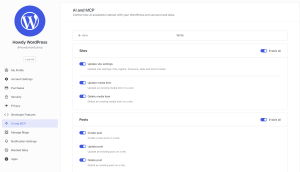
You can also now enable MCP access and tooling on a per-site basis by going to Sites → Your specific site → Settings → External AI agent access.
Development
Studio Sync now available on Personal and Premium plans in WordPress Studio
Studio Sync — which lets you sync a locally developed site from the WordPress Studio desktop app to and from your live WordPress.com sites — is now available on all paid plans, including Personal and Premium.
Learn more about developing your WordPress.com sites locally with Studio in our documentation.
Newsletters
Give subscribers complimentary access to your paid newsletter
Newsletter publishers can now grant individual subscribers complimentary paid-tier access — no credit card required on their end. From your Subscribers screen, you can assign a specific subscriber complimentary access, choose which paid plan level they get, and remove it at any time.
Fixes and improvements
We also shipped additional reliability and polish updates across WordPress.com this week, including:
- Adding a breadcrumb trail to detail pages in your site stats to make it easier to navigate backward to previously visited pages.
- Fixing an issue that prevented newsletter publishers with a single billing interval from completing a subscriber import.
- Fixing a crash that could prevent images from loading in the editor on some sites.
-
The Top 10 Creative WordPress Themes with Real Personality
10 aprile, di Amanda Coopersmith — Tips and Tutorials, Design, Themes, wordpress-com Some WordPress themes are built for legibility. These are built for expression.
Whether you’re an artist, maker, or creative business owner, the right theme doesn’t just display your work — it is part of your work.
Here are 10 creative WordPress themes for making a real visual impression.
How I tested these WordPress themes
Whenever I evaluate a theme, I always try it out on my WordPress staging site first.
For each theme, I customized the homepage layout (changing sections, images, and text), explored the templates and patterns libraries (pre-built page layouts and design blocks), and tested any built-in features and unique design elements. I then ran a few blog posts through each theme to see how they handled content.
My goal was to choose themes that make it easier for your website to feel uniquely yours:
- Sankofa: Best for cultural organizations, museums, and archives
- Memphoria: Best for fashion and design bloggers
- Miko: Best for personal portfolios
- Kawaii-Chan: Best for beauty and style influencers
- Feelin’Good: Best for nostalgic creators and bloggers
- Roblog: Best for gamers and streamers
- Parr: Best for artists, gallerists, and visual portfolios
- Punk: Best for musicians and bands
- Psychedeli: Best for groovy bloggers
- The Jazzers: Best for music bloggers
Let’s look at each of them in detail:
1. Sankofa: Best for cultural organizations, museums, and archives
- Setup: Intermediate/advanced
- Who should use it: Museums, cultural organizations, archives, and institutions that publish rich editorial or historical content
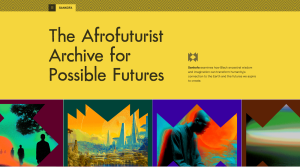
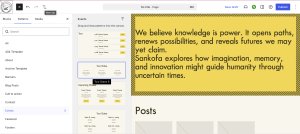
Sankofa is a robust theme that draws on Afrofuturist design, with bold colors, original geometries, fractal patterns, and expressive fonts.
The standout features are its angular image shapes, which appear across page templates, and its customizable About pattern.
For best results, add your images at the block or archive level rather than replacing them one by one — this ensures the angular shapes display correctly across your site.
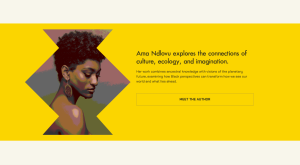
Sankofa includes seven unique page templates and two theme-specific patterns, including an organization manifest, which is especially useful if you want to include a company page.
The verdict
With some customization, Sankofa offers all the tools you need to build a robust, visually striking website. To get the most out of this theme, you need to be comfortable with patterns, loops, and parent block functions. A word of caution: If you’re new to WordPress, this theme has a steeper learning curve than others.
2. Memphoria: Best for fashion and design bloggers
- Setup: Beginner
- Who should use it: Bloggers who want to show a lot of personality with a wild edge
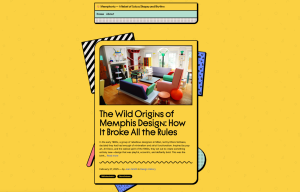
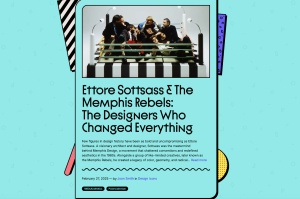
Memphoria offers a quirky blog layout, with a feed that stacks posts like a layered collection of Polaroids. Together with its six candy-colored theme options, this WordPress theme has a wild, maximalist feel that’s hard to replicate.
It comes with six-page templates and custom styling options for the feed, tags, and separators.
I particularly liked the kooky separator options: wavy, dots, zig-zag, and wiggly, which add a playful vibe.
The verdict
Memphoria’s Polaroid-style homepage and additional page templates make it easy to build a distinctive, personality-driven blog with minimal setup.
However, that strong aesthetic means this theme offers limited customization for websites that require greater design flexibility.
3. Miko: Best for personal portfolios

- Setup: Intermediate
- Who should use it: Personal websites, writers, and other non-visual portfolios
Miko offers a split-page site design with a bold color palette and an unconventional approach to navigation — instead of a traditional header, the sticky panel on the right side of the screen keeps your primary photo and title visible on every page.
This layout is great for personal websites and portfolios centered on one strong image because it keeps your brand closely anchored to your content on the left.

The verdict
Miko is a good option if you need a personal site with just a single strong image, such as a headshot or brand photo. It’s a great fit for resumes, project links, or writing samples.
4. Kawaii-Chan: Best for beauty and style influencers
- Setup: Beginner
- Who should use it: Influencers, creators, and bloggers
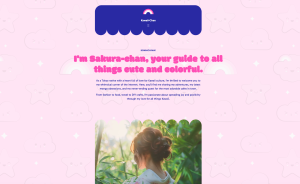
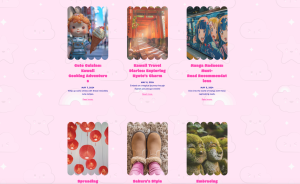
Kawaii-Chan lives up to its name and inspiration: lively, sweet, and available in multiple pastel colors.
The rounded headers and footers and bubble-style image frames create a cozy and playful atmosphere, and the built-in kawaii background pattern immediately sets the tone for the site’s aesthetic.
The verdict
Kawaii-Chan is a fun theme if you want your lifestyle blog to express a cartoonish, childlike charm.
If you feel the background pattern is a little too much, you can easily swap it out under Theme Design → Background — a handy option if you want a cleaner look while keeping the kawaii aesthetic.
5. Feelin’Good: Best for nostalgic creators and bloggers

- Setup: Beginner/intermediate
- Who should use it: Creators looking for a theme with a nostalgic, retro internet aesthetic
Feelin’Good opens to a colorful homepage image with a semitransparent blog feed. The default look is pure vaporwave, but you can easily swap the site imagery to create different moods.
The header lets you add a logo or a headshot to the right corner, while the footer includes a finger icon that fits the retro style.

The verdict
If you want to add ’80s or ’90s stylings to your site, this theme works perfectly. You can also tailor the visual style with a different background image or color scheme.
6. Roblog: Best for gamers and streamers
- Setup: Beginner
- Who should use it: Gamers, streamers, and playful bloggers
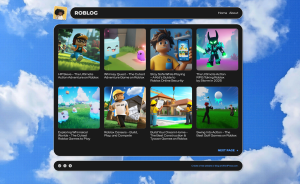
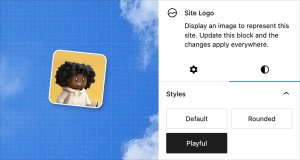
Roblog is a nod to the iconic Roblox platform, featuring rounded block styling and a “Playful” logo style that tilts your icon in a mischievous reference to Roblox’s own branding.
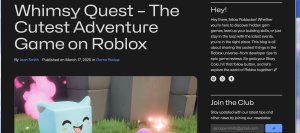
It’s the only theme on this list with a two-column post layout. The sidebar gives you space for an About section, related categories, and a subscription block — making it easy to build your email list right alongside your content.
The verdict
Roblog is a fun theme with useful functionality, such as sidebar subscriptions. The two-column layout is also a big advantage for blogging, but it might feel limiting if you plan to feature other types of content.
7. Parr: Best for artists, gallerists, and visual portfolios

- Setup: Beginner
- Who should use it: Photographers, artists, or anyone needing an image-driven website
Parr is a curatorial theme that puts bold imagery front and center. The sideways text elements free up visual space, while the individual blog pages resemble spreads from an art magazine.
The “previous” and “next” buttons on each edge create the feel of turning the page.

Parr’s layout doesn’t offer any variation, but you can still modify the fonts and colors to create your own distinct look.
The verdict
If you’ve got a visual site and want your images to shine, Parr is the perfect backdrop. It’s a great option for portfolios and photo journals.
You can play around with the theme’s style options to match your brand, but make sure that Parr’s bold, defined layout is a good fit for your vision.
8. Punk: Best for musicians and bands

- Setup: Intermediate
- Who should use it: Alternative music bloggers, bands, and musicians
Punk leans hard into the zine aesthetic and commits to it fully. The halftone effect automatically converts your images into one of six two-tone color schemes for a raw, DIY feel.
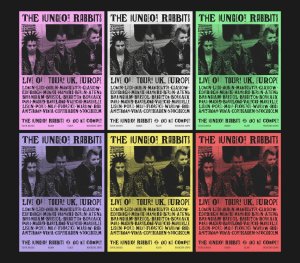
It’s one of the most customization-rich themes on this list. Beyond the homepage, individual posts and pages keep the aesthetic alive with doodles and other lo-fi design elements.

The verdict:
If you like the punk or zine aesthetic, this theme delivers a ton of character throughout your site from the start.
However, if you have lots of content and site imagery, prepare yourself to spend some time making sure everything looks good in halftone.
9. Psychedeli: Best for groovy bloggers
- Setup: Beginner
- Who should use it: Bloggers who love a psychedelic, counterculture feel
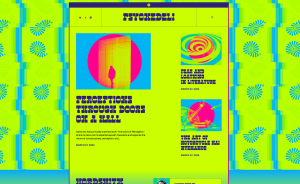
Psychedeli channels the ’60s with neon tones, exaggerated fonts, and psychedelic patterns.
The style variations are more than just color palette tweaks. The backgrounds and fonts also change, so each variation feels like its own distinct site.
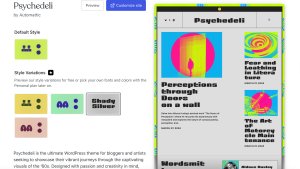
Like Punk, Psychedeli automatically adjusts your images to match the theme’s color palette for a cohesive site-wide look.
The verdict
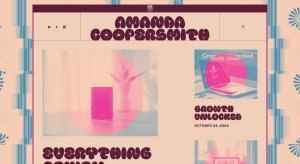
Psychedeli is a bold, vibrant theme that plays nicely with your blog content right out of the box. The color effects are part of the style. However, if you have high-quality images and want to preserve their original style, this might not be the right fit.
10. The Jazzers: Best for music bloggers
- Setup: Intermediate
- Who should use it: Music bloggers and reviewers
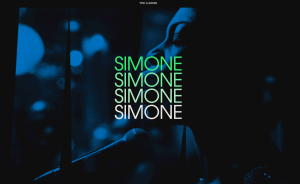
The Jazzers theme aims to recreate the feeling of browsing through a vinyl collection.
The large-scale title text and background images evoke classic album sleeves — a perfect aesthetic for music lovers.
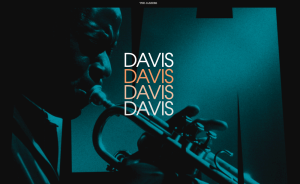
This theme makes it easy to curate an attractive blog feed and has enough character for a vibrant music blog.
The verdict
If you want your pages to feel like a much-loved vinyl collection, this theme is right up your alley. It does take work to manage the visual tweaks and lengthy titles, though, so make sure you’re willing to put in the effort every time you post.
Build something great with WordPress.com
I’ve given you my take on the top 10 creative WordPress themes, but you know your work better than any list does. The right theme will click the moment you see it.
The best way to find the right fit is to build a site on WordPress.com and explore the options for yourself.
If you already have a vision, get a custom look fast with our AI website builder. Just describe the look and feel you want with a text prompt and launch your site with managed WordPress hosting.
Ready to find the right look for your website?
-
Give Friends Free Access with Complimentary Subscriptions
9 aprile, di Rob Pugh — Newsletter, Product Features If you run a paid newsletter on WordPress.com, you’ve probably wanted to give someone free access to your paid content. A friend who supports your work. A fellow writer you admire. Your mom.
Now you can. Jetpack Newsletter offers complimentary subscriptions that let you give any subscriber free access to your paid plans, right from your subscriber list.
How it works
From your site’s dashboard, navigate to Jetpack → Subscribers. Find the subscriber you want to comp, click the three dots (⋮) next to their name, and select “Comp a subscription.”
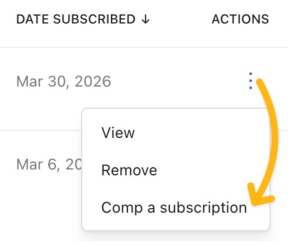
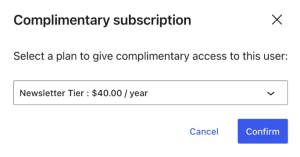
Select the newsletter plan you want to give them access to and click Confirm.
They’ll get an email letting them know they have access to your paid content, and their subscription type changes to “Comp” on your Subscribers page.
You can also comp from the subscriber detail view: click on a subscriber’s name to open their profile, then click “Comp a subscription.”
You can comp free subscribers, email-only subscribers, and even people who aren’t currently subscribed (they’re added as a subscriber automatically). You can also remove a complimentary subscription anytime, and the subscriber reverts to free.
Reward your most important subscribers with free access
Once you have a paid newsletter, you’ll find plenty of reasons to comp people:
- Family and friends you’d never charge
- Fellow writers for cross-promotion
- Contest winners and giveaway recipients
- VIP readers you want to reward for loyalty
- Sources and collaborators who contribute to your work
If you’ve migrated from another platform, you can use complimentary subscriptions to give your VIPs paid access right away.
Running a paid newsletter on WordPress.com
Complimentary subscriptions are one piece of the Jetpack Newsletter toolkit that keeps getting better. If you haven’t explored paid subscriptions yet, here’s what you can do right now on WordPress.com:
- Create a paid newsletter on any WordPress.com plan, including free.
- Set your own monthly and yearly pricing.
- Collect payments through Stripe with creator-first pricing that doesn’t take a cut of your revenue.
- Manage subscribers, track email performance, and organize content with newsletter categories.
- Own your content and subscriber list. Export everything, anytime.
Keep more of what you earn
If you’re comparing paid newsletter platforms, pricing matters. WordPress.com takes 0-10% of your subscriber revenue based on your plan. Substack always takes 10%. That really adds up.
With 100 paid subscribers paying $10 per month, Substack’s cut is $100/month. With 1,000 subscribers, it’s $1,000/month. At 10,000, you’re handing Substack $10,000 every month.
On WordPress.com, your cost stays the same no matter how many subscribers you have.
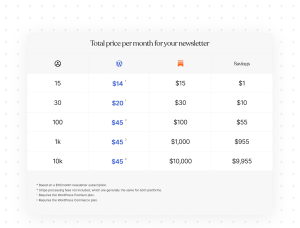
The more you grow, the more you save. With 1,000 paid subscribers, you save $955 every month on WordPress.com. That’s the difference between a platform that scales with you and one that scales against you.
Get started
If you already have a paid newsletter on WordPress.com, complimentary subscriptions are available now in your Jetpack Newsletter subscriber list. No extra setup is needed.
If you’re on Substack or another platform and ready to make the switch, importing your newsletter takes just a few minutes. Bring your posts, your subscribers, and your paid plans with you.
Ready to try it? Head to your Jetpack Subscribers page to get started.
-
How WordPress 7.0 Is Building the Foundation for AI-Powered Sites
8 aprile, di WordPress.com Staff — Product Features, AI Tools, AI website builder Until now, every WordPress plugin that integrated AI had to build its own foundations.
The upcoming WordPress 7.0 changes this by introducing a shared infrastructure that supports how AI works across sites.
AI tools can now discover what a site can do, access AI services through a consistent layer, and trigger actions across plugins without requiring custom integration code for every combination.
The Abilities API: Defining what a site can do
WordPress 6.9 introduced the Abilities API as one of the first foundational pieces of this infrastructure. It gives plugins a standard way to register their capabilities in one place.
Instead of each plugin building its own custom integration, it declares what it exposes:
- Specific actions
- The inputs those actions need
- What they return
- Which permissions are required
Those capabilities become discoverable through REST endpoints or the Model Context Protocol (MCP) Adapter.
This means automation tools and AI assistants can interact with WordPress without needing custom code for every plugin. A tool such as Zapier or an AI assistant such as Claude reads what’s available and acts on it.
A practical example: WooCommerce can register capabilities such as updating stock status, retrieving order data, or modifying product attributes. An AI assistant connecting to that site discovers those capabilities automatically. It doesn’t need a bespoke WooCommerce integration — it works with what the plugin has declared.
The WordPress AI Client: One connection to AI models
Before the WordPress AI Client, every plugin that wanted to use AI handled its own integration. Authentication, request formatting, response parsing — all built from scratch, again and again.
The AI Client introduces a shared interface for interacting with AI models. Plugins send prompts through one consistent layer, regardless of the provider.
WordPress 7.0 introduces the Connectors API alongside it. This is a system for managing connections to external services. It also adds a Connectors screen where site owners can configure AI providers in one place. Once configured, those connections are available across plugins without needing additional setup.
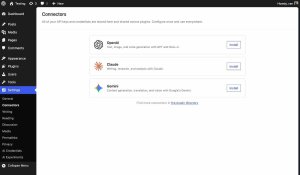
This makes AI interactions composable across plugins.
A workflow can span multiple tools, such as retrieving WooCommerce product data and passing it through an AI model to generate descriptions, without custom glue code holding it together.
For developers, this means no more rebuilding the same integrations. For site owners, it means configuring AI once and using it everywhere.
The MCP Adapter: Connecting to external AI tools
MCP is an open standard for how AI assistants communicate with external tools. The WordPress MCP Adapter implements that protocol for WordPress, exposing registered abilities as tools that any MCP-compatible client can discover and call.
The adapter ships separately from WordPress core and was available prior to 7.0, but it becomes significantly more useful with the new AI infrastructure in place.
Once connected, tools such as Claude, ChatGPT, or Gemini can see what your site can do and trigger actions directly.
This opens up workflows that would have required significant manual work or custom scripting before, such as having to:
- Batch-update hundreds of posts with a single natural language command.
- Find all WooCommerce products with inconsistent attributes and standardize them at scale.
- Query order data to identify top-performing products or spot return trends.
How the pieces fit together
Each component handles a different part of the problem. The Abilities API defines what actions a site can perform. The AI Client connects plugins to AI models. The MCP Adapter exposes those actions to external AI assistants.
Here’s what it might look like in a real workflow:
- An AI assistant retrieves posts from WordPress.
- An AI model analyzes the content.
- The assistant triggers an ability to update the metadata.
Each step uses shared infrastructure. This makes these workflows reusable and composable across the ecosystem rather than locked inside a single plugin.
How this works on WordPress.com
On WordPress.com, this infrastructure is already in place.
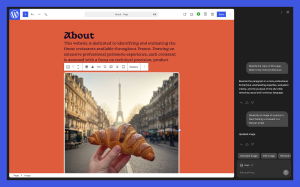
Site owners can use the AI Assistant directly in the editor and Media Library to create and rewrite content, adjust layouts, generate images, and more. You can also connect the WordPress site to Claude to analyze content, identify gaps, generate ideas, and push updates back to your site.
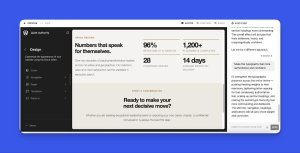
For development, WordPress Studio provides a local environment where you can use tools such as Claude Code to build and test plugins, themes, and custom functionality. Telex extends this further, letting you generate blocks and themes from prompts and add them to your site.
The bottom line
The AI infrastructure in WordPress 7.0 is making AI-powered plugins and workflows possible at scale.
The Abilities API and AI Client are at the core of that shift — a shared infrastructure that gives the entire ecosystem something consistent to build on.
Together, they represent a meaningful step toward creating a world where WordPress doesn’t just support AI workflows but actively enables them.


 RSS 2.0