 AgoraVox Italia
Start a WordPress blog or create a free website in seconds. Choose from over 200 free, customizable themes. Free support from awesome humans.
http://www.imhoffpress.worpress.com
Articoli
-
WordPress.com Changelog: Sharper Image Editing and a New Way to Multitask
19 giugno, di WordPress.com Staff — Changelog, AI Tools, Editor, Plugins
June 5 – 18, 2026
Welcome back to the WordPress.com changelog! These two weeks smoothed out everyday work — sharper image editing and easier-to-scan notifications. And if you connect an AI agent like Claude or ChatGPT to your site, it can now do a lot more, including editing your site’s design and managing plugins.
Editing and media
Crop and resize without the friction
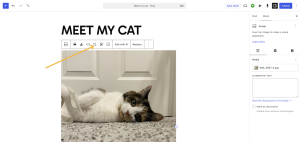
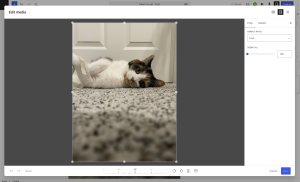
Working with images on your site just got more forgiving. The in-editor crop and resize tools are now available across all WordPress.com sites, so you can frame a photo exactly how you want it without leaving the editor or opening a separate app.
Open a post or page, add an image, and then click the crop button to launch the new experience:
Plugins
Desktop Mode: a new, free way to multitask in WordPress
If you juggle a lot at once — drafting a post while uploading media, tidying pages, clearing comments — Desktop Mode turns your WordPress admin into a workspace that’s reminiscent of your computer desktop.
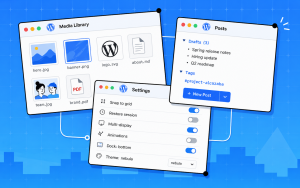
Open posts, pages, and media as separate windows you can resize and arrange, jump anywhere with a quick command search, and recover anything from a single Recycle Bin that covers posts, pages, media, and comments.
It’s a free, open-source plugin from Automattic, available now. Install it on any paid WordPress.com plan.
AI
Your AI agent can now do more on your WordPress.com site
If you connect an AI agent to WordPress.com, it can now help you with a lot more. On top of managing your content, a connected agent can now also:
- Edit your site’s design: templates, menus, navigation, and styles
- Manage plugins on plugin-enabled sites: search, install, activate, and update
- Handle team access: invite people, change roles, and manage permissions
- Create a site: spin up a new WordPress.com site from a description
- Look up account details: billing and subscriptions
As before, you stay in control. It’s off until you turn it on, every tool is opt-in, and you can disable it for specific sites at any time.
Fixes and improvements
We also shipped a round of polish and reliability updates across WordPress.com, including:
- Fixing an error that caused the Add Mailbox page to fail the first time you opened it, so adding a mailbox to your email no longer needs a refresh.
- Fixing a crash in the post editor after generating a video Clip on a site without specific settings.
- Correcting renewal dates shown in checkout terms to show in your display language.
- Fixed social shares to Threads not showing a link preview card when the post used a custom message without the URL. Posts now include the link card automatically.
-
Meet Desktop Mode: A New Workspace for WordPress Admin
12 giugno, di WordPress.com Staff WordPress already holds your content, media, users, plugins, and more.
But managing all of those moving pieces often means jumping between admin screens, browser tabs, and disconnected workflows.
Desktop Mode, a free and open source plugin built by Automattic, gives WordPress admin a desktop-style workspace.
Windows open, resize, and stack. A dock sits on the left. Virtual desktops let you switch between workflows. It runs on top of WordPress exactly as it is: your site, your plugins, your setup, all untouched.
A better way to move through WordPress
Posts, pages, and media open as individual windows, so you can have a draft open next to your media library and drag files directly between them—no tab switching. No losing your place.
Send content to a shared folder so your team can review and approve it before it goes live. Restore anything from a unified Recycle Bin covering posts, pages, media, and comments, all from one place. Your window layout saves between sessions, so you pick up exactly where you left off.
A unified command palette (Cmd+K) gives you fast access to everything. The optional AI copilot lets you search across your content, find posts by topic, surface related pages, and get quick answers about what’s on your site. Multiple desktops, called Spaces, let you keep separate projects or workflows organized without cluttering your view.
Built to be extended
Desktop Mode comes with hundreds of hooks built in. Every significant behavior is extendable, meaning plugin authors can register native windows, dock items, desktop icons, commands, and AI tools from their own plugin with no patches to Desktop Mode required. You can even register your own AI provider, wiring Desktop Mode’s copilot to any model or service you choose.
Here’s what that looks like in practice: a booking plugin could open its calendar as a native window directly inside Desktop Mode instead of sending you to a separate admin page. A WooCommerce extension could surface your orders dashboard right in the dock. Nick, a long-time WordPress developer, built a native plugin on top of Desktop Mode to test this extensibility from day one, and it works.
Desktop Mode runs entirely in the admin layer, so your site’s frontend, your store, and your checkout are completely unaffected.
The same architecture that lets thousands of WordPress plugins coexist applies here. It’s open source, the code is on GitHub, and contributions are open.
What this opens up
WordPress has always been more than a publishing tool. It’s a platform built to be shaped, not just used. Desktop Mode is a bet on that idea.
What if the place where you manage your site also felt like a real workspace? Where your team can review content before it goes live, your tools open where you need them, and you stop losing time navigating between screens? That’s what we’re building toward.
Already running on hundreds of sites in its first week, it’s actively maintained by Automattic and the community is building on it. This is the foundation and we can’t wait to see where it goes.
Try WordPress desktop mode: It’s free
Desktop Mode is free for all WordPress users and available today.
Installation
- Download the plugin here or install via Plugins → Add New → Upload Plugin.
- Upload the plugin folder to /wp-content/plugins/
- Activate the plugin through the Plugins screen in WordPress.
- Click the desktop icon in the admin bar’s top-right corner. The admin reloads inside the desktop shell.
- Click the same icon again at any time to return to the classic admin.
It’s a per-user opt-in, so activating it doesn’t affect anyone else on your team until they choose to turn it on themselves.
-
4 Ways to Make Your Website More Discoverable by AI Search
11 giugno, di Philip Adams Your homepage is the front door to your website. In AI search, you also have to explain why the door is worth opening.
Research shows these AI-generated results are becoming increasingly common. One 2026 study found Google AI Overviews appeared for 13.7% of trending queries overall and nearly 65% of question-based searches.
Beyond SEO best practices, your website needs to do more than just rank. It needs to clearly communicate who you are, what you offer, who you help, and why someone should trust you.
TLDR: AI discovery is becoming a new growth channel — one built less on publishing more, and more on making your website and business easier to understand.
AI as a new growth channel
Google has been expanding AI-powered search experiences like AI Overviews and AI Mode, while its guidance explains how websites can appear in AI features in Search.
But the goal is not to chase AI overview optimization as a separate trick from SEO. The bigger opportunity is what happens before someone clicks: AI tools increasingly help people compare options, summarize trade-offs, and decide who belongs in the conversation.
That makes AI discovery a new growth channel, but not in the “hack the algorithm” sense. Highly cited websites make their value unmistakable: who they help, what they offer, why they are credible, and what makes their work different.
That clarity is harder to build when your story is scattered across social profiles, videos, newsletters, and review sites. Those channels can help people discover you, but they are not a substitute for your own website.
Third-party platforms control the algorithm, the audience, and the experience. Your website lets you control the message, the structure, and the relationship with your audience.
When your website clearly explains your unique offering, AI tools have less to infer and more to understand.
The goal: Don’t publish more for the sake of it. Build a reliable home base that makes your work easier for people and AI systems to understand.
4 things AI tools need to understand about you
AI systems do not understand a website because it publishes frequently. They understand it when information is clear, consistent, and specific. Four areas matter most:
1. A clear explanation of who you help
Visitors should be able to quickly understand what you do, who you serve, what problem you solve, and what action they should take next.
The same clarity helps AI systems categorize and interpret your website. Avoid relying on vague marketing language that forces visitors to decode your positioning.
A simple framework such as “We help [audience] achieve [outcome] through [offer]” often provides a strong starting point.
From there, create dedicated pages for major services, products, audiences, or use cases. Websites that serve multiple customer groups should explain each audience separately. If you have multiple offerings, you should give each its own landing page.
Instead of keyword stuffing, you need to make your expertise easy to understand.
2. Useful answers to customer questions
AI search is heavily influenced by questions.
People ask AI tools how to compare options, what something costs, what mistakes to avoid, who a product is best suited for, and what steps they should take next. Websites that publish useful answers to those questions create content that serves both customers and AI systems.
Think about the conversations you have before a sale. Prospective customers often want guidance before they are ready to buy. A designer might explain how to prepare for a website redesign. An accountant might outline tax considerations for new companies. A consultant might compare different approaches to solving a common operational challenge.
This type of content acts as decision support rather than promotion.
A blog is often the best place to publish these resources. Blog posts can connect naturally to service pages, product pages, pricing information, newsletters, and contact forms. That structure helps visitors navigate your expertise while helping AI systems understand how topics relate to one another.
The more connected your content is, the easier it becomes for people and AI systems to see the shape of your expertise.
3. Visible trust signals
AI discovery is about relevance as much as credibility
Your website should make it easy to see that a real person, team, or organization stands behind the content.
Useful trust signals include:
- A detailed About page
- Clear contact information
- Author or ownership details
- Testimonials and customer stories
- Case studies or portfolio examples
- Accurate dates on time-sensitive content
- Transparent service, product, or pricing information
You do not need enterprise-scale authority signals. Most small teams and independent website owners simply need enough evidence to demonstrate expertise and legitimacy.
Specific, trustworthy information helps AI systems interpret your content more confidently. It also helps potential customers feel comfortable taking the next step.
4. A website that brings it all together
There is no guaranteed way to earn AI citations, recommendations, or visibility. But AI discovery is not a mystery either. It starts with making your website easier to understand.
That means your most important pages should be public, crawlable, and clear. Your homepage, About page, service or product pages, and key customer questions should explain what you do, who you help, and why someone should trust you.
The same structure that helps people navigate your site also supports AI search optimization. Clear headings, useful answers, internal links, text-based information, fast page load times, secure hosting, and accurate structured data all help search systems interpret your content with greater confidence.
The deeper point is this: website discoverability improves when your site feels like a complete, reliable source of truth. Not a thin homepage. Not scattered social posts. Not a collection of disconnected updates. A real home base that explains your work clearly and grows with you.
That is the foundation worth investing in before you worry about AI overview optimization or any new search label. The stronger your website is, the easier it becomes for people and AI systems to understand why your work matters.
Master SEO and AI optimization
AI discovery doesn’t replace SEO. It builds on many of the same fundamentals: creating helpful content, structuring your site clearly, and making it easier for both search engines and AI tools to understand what your business does.
If you’d like a practical introduction to both, take our free Master SEO & AIO course. You’ll learn how search engines and AI-powered tools discover content, along with actionable techniques to improve your site’s visibility.
Build your AI-ready home base with WordPress.com
The web is filling up with AI-generated answers. That makes having your own corner of the internet more valuable, not less.
When someone asks an AI tool about your industry, your product, your expertise, or the problem you solve, what should they find: a scattered collection of social posts and platform profiles or a website that clearly explains who you are, what you do, and why people trust you?
With the WordPress.com AI Website Builder, you can launch a site quickly and shape it around your work. With the WordPress AI Assistant and other AI tools on WordPress.com, you can create and improve content faster. And with built-in managed hosting, security, and performance, you can focus less on maintenance and more on building something worth discovering.
AI can generate answers, and your website should be where the answers come from.
-
Develop Locally on Linux with WordPress Studio
11 giugno, di Rahul Gavande — Development, WordPress Studio The WordPress Studio desktop app is now available for Linux, starting with Ubuntu. If you’ve been building with our Studio CLI on Linux, the desktop app now joins it.
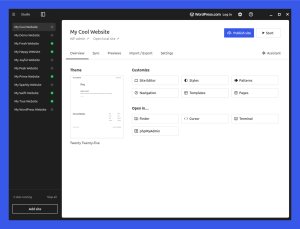
Studio is the fastest way to spin up a real WordPress site on your own computer. No Apache config. No Docker. No “it works on my machine.” Just click Add site, and a few seconds later you’ve got a working WordPress install ready to build on, connected to your favorite editor, and shareable with collaborators through a one-click preview link.
And it’s free and open source.
A UI for local WordPress development on Linux
Studio on Linux has the same features developers already rely on to build sites, plugins, and themes:
- Instant local WordPress sites with no servers to configure
- Custom domains and HTTPS for your local sites, so you can develop against realistic URLs
- One-click preview links to share your work-in-progress with clients, teammates, or testers
- Two-way sync with WordPress.com, so you can pull a production or staging site to your laptop and push changes back when you’re ready
- Open in your favorite editor — VS Code, PhpStorm, Sublime, and others, detected automatically
- A built-in assistant to help you write code, make changes, and debug
Built for the way Linux developers work
WordPress powers a huge slice of the open web, and Linux powers the servers that most of the web runs on — the tool you use to build WordPress sites locally should run there, too.
The CLI version of Studio has been on Linux for a few weeks; now the desktop experience matches what macOS and Windows users have relied on for years.
How to get Studio on Linux
Studio for Linux is available to download today. Head over to the Studio download page, grab the Linux build, and you’ll be up and running on Ubuntu in a few minutes.
We’re continuing to polish the Linux experience, and auto-updates, broader distro support, and more packaging options are on the way. The more we hear from you, the faster we’ll get there. Try it out and share feedback on GitHub.
-
10 Brand-New WordPress.com Features From Radical Speed Month
10 giugno, di Philip Adams Radical Speed Month has wrapped! For one month, Automatticians built in the open, shipped fast, and shared their work. The result is a stack of projects that make WordPress.com more flexible, more useful, and more connected than ever.
Look at the projects below, and you’ll see that WordPress.com is becoming a better place to write, build, sell, prototype, repurpose, and tinker.
WordPress.com has always evolved to make publishing, building, and managing sites easier. What’s shifting now is context. AI gets a lot more useful the moment it understands your site, your content, your workflow, and what you’re actually trying to make.
Note: Many of these features are still in beta and are actively evolving.
What is Radical Speed Month?
Radical Speed Month is a creative experiment led by developers, designers, marketers, and many others across the Automattic team to build, ship, and test WordPress.com features faster.
Rather than chasing perfection, the goal was to move quickly before ideas got too precious, share what was in progress, and iterate in real time based on your feedback.
Radical Speed Month produced a multitude of experiments, features, and prototypes.
Here are 10 that stood out:
- Workspace
- WordCamp Agent
- Blueprints Gallery
- Achievements
- Easy Site Editor
- Lately
- A short-form social media theme
- Social Feeds
- Write
- Desktop Mode
- Bonus: Wapuu-Studio
- Bonus: Clips (coming soon)
These projects differ from one another, but the same patterns keep showing up: publishing is getting lighter, development is getting faster, creator workflows are becoming more flexible, and AI is moving from “write this for me” to “help me work.”
The projects below span publishing, development, AI, and creator workflows. Together, they offer a small snapshot of what teams across Automattic explored during Radical Speed Month.
1. Workspace
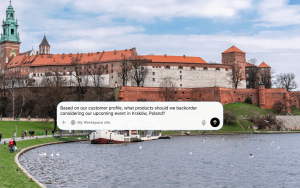
Built by Artur Piszek What is WordPress Workspace? WordPress Workspace is a desktop app that brings WordPress Agent into your Mac workflow.
The highlight here is context. Instead of bouncing between a browser, notes app, media library, an AI assistant, and file uploads, Workspace gives people a way to work with WordPress within the flow of their day.
You can ask questions about your site, dictate thoughts, upload screenshots and images, transform selected text, and get help without rebuilding the same context over and over.
Why it stands out: your WordPress site already contains the shape of your work – posts, pages, media, products, audience context, drafts, and ideas. Workspace treats that context as something useful while work is happening, not only after something is ready to publish.
2. WordCamp Agent
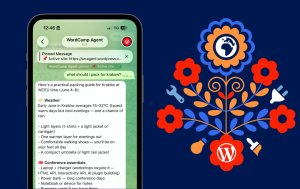
Built by Artur Piszek What is WordCamp Agent? WordCamp Agent is a Telegram assistant built for WordCamp attendees. It can help you plan your trip, browse the conference schedule, remember your interests and preferences, save notes during sessions, and turn those notes into a post or recap later.
The highlight is context. WordCamp Agent is powered by WordPress Guidelines, the system under the hood that stores agent-facing knowledge directly inside WordPress: instructions, memories, skills, and artifacts.
Why it stands out: Useful AI depends on useful context. A one-off prompt can help with one task, but a structured memory layer can support many workflows over time. WordCamp Agent shows what that looks like in practice: a WordPress-powered assistant that can remember, respond, and help people move from information to action.
3. Blueprints Gallery (WordPress Studio)
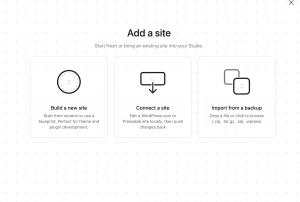
Built by Kateryna Kodonenko What is the Blueprints Gallery? The Blueprints Gallery is a feature in WordPress Studio that lets developers launch reusable WordPress environments from preconfigured blueprints.
The highlight is practical speed. Instead of rebuilding the same local setup again and again, users can launch reusable WordPress environments from preconfigured blueprints.
That reduces setup work and makes it easier to prototype, test, and share development patterns.
Why it stands out: it removes repeated work without asking developers to give up flexibility. If the first hour of a project is usually setup, configuration, and remembering what worked last time, reusable environments change the pace of the work.
4. Achievements

Built by Dean Sas and Jacopo Tomasone What are WordPress.com Achievements? WordPress.com Achievements is a feature that celebrates progress and milestones on WordPress.com, helping creators track their momentum as they publish.
Publishing frequently is a habit worth cultivating – and this feature encourages just that.
Why it stands out: better tools should not make people feel removed from their work. They should help people stay on track.
5. Easy Site Editor
<script src='https://v0.wordpress.com/js/next/videopress-iframe.js?m=1770107250'></script>Built by Glen Davies What is Easy Site Editor? Easy Site Editor is an experiment that makes editing a WordPress site feel more approachable.
The goal is to make the path from idea to update easier to follow.
Why it stands out: WordPress has depth, flexibility, and extensibility. The challenge is helping more people access that power without needing to understand everything at once.
This points toward clearer site-building workflows for creators updating pages, agencies working with clients, businesses iterating on offers, and new users getting their first site into shape.
AI can suggest, generate, and automate. But the editing experience still has to feel understandable.
6. Lately
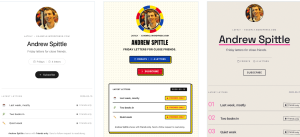
Built by Andrew Spittle What is Lately? Lately is a messaging-first publishing experiment that lets you create private weekly letters by chatting with WordPress Agent.
Instead of asking users to begin inside a traditional editor, Lately lets them interact with WordPress Agent through a lightweight conversational workflow to create private weekly letters.
The highlight is capture. Ideas do not always arrive when someone is sitting in front of a blank editor. They show up in messages, notes, quick reflections, and half-formed thoughts.
Lately explores what happens when WordPress meets people closer to that moment.
Why it stands out: it connects lightweight capture and AI-assisted shaping back to a publishing system the user controls.
7. Theme for Short-Form Blogging

Built by Dave Martin What is the theme for short-form blogging? This short-form social media theme is a WordPress.com theme for lightweight, social-style publishing.
The highlight is immediacy. Not every post needs to be a long essay. Sometimes people want to publish a thought, a link, an image, an update, a reblog, or a quick reflection.
Social platforms made that behavior feel natural, but they also trained creators to build on rented feeds.
Why it stands out: this project brings some of that casual publishing energy back to a space the creator owns.
8. Social Feeds
<script src='https://v0.wordpress.com/js/next/videopress-iframe.js?m=1770107250'></script>Built by Jeremy Herve What is Social Feeds? Social Feeds brings Bluesky, Mastodon, and the wider Fediverse into the WordPress.com Reader.
The highlight is connection. Instead of jumping between social apps, users can follow people, read posts, react, reply, and publish from one place inside WordPress.com.
For creators, the useful part is choice. A quick thought can stay short and social. But when it grows into something bigger, WordPress.com gives it somewhere to go: a post, a site, an archive, and a home the creator owns.
Why it stands out: Social Feeds fits neatly with the short-form blogging theme. Together, they point to a more flexible publishing loop: read, react, post, expand, repurpose, and publish across formats without giving up ownership.
9. Write
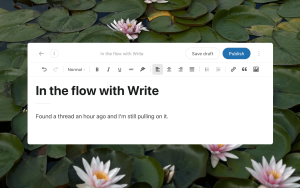
Built by Jamie Marsland, Allison Levine, and Kim Brown. What is Write? Write is a simplified posting experience built for writers on WordPress.com. It gives you one page, a blinking cursor, and only the formatting tools you need when you need them.
The highlight is focus. Instead of starting inside the full block editor, Write gives creators a cleaner surface for getting words down quickly. The interface stays intentionally minimal, then brings in formatting when it helps and gets out of the way when it doesn’t.
For writers, the useful part is flow. Write posts are still real WordPress posts, so they live alongside your other content, work with your theme, and can be opened in the block editor later if you want more control.
Why it stands out: Write fits with the broader push toward lighter, faster publishing workflows. Alongside Lately, the short-form blogging theme, and Social Feeds, WordPress.com is exploring more ways to help people capture ideas, publish quickly, and stay in control of where their work lives.
10. Desktop Mode
Built by Daniel López Sánchez and Roberto Aranda
What is Desktop Mode? Desktop Mode is a free, open source plugin that gives WordPress Admin a desktop-style workspace.
The highlight is movement. Instead of jumping between admin screens, browser tabs, and disconnected workflows, Desktop Mode lets you open WordPress tools as windows, resize them, stack them, and move between different spaces.
Posts, media, plugins, settings, and site tools can all feel more like part of one working environment.
Why it stands out: Desktop Mode points to a more flexible version of WordPress Admin. It keeps the power of WordPress intact, but gives users a different way to move through it: less linear, more visual, and easier to organize around the task at hand.
Bonus: Wapuu Studio
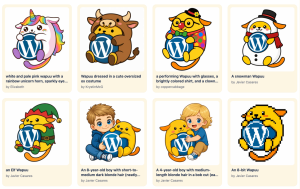
What is Wapuu Studio? Wapuu Studio is an AI-powered tool that lets you create and share your own custom Wapuu with the WordPress community.
The highlight is creativity. Simply describe the Wapuu you’re imagining—its mood, outfit, theme, colors, or tiny adventure—and Wapuu Studio turns that idea into a unique character. You can browse community creations, remix ideas, and share your own designs.
Why it stands out: Not every RSM project is about productivity. Wapuu Studio shows how AI can also make it easier to create, play, and participate in the WordPress community. It transforms a simple prompt into something visual, personal, and shareable while celebrating one of WordPress’s most recognizable mascots.
Bonus: Clips (coming soon)
Built by Sarosh Aga and Aagam Shah. What is Clips? Clips is a feature that turns WordPress.com posts into short-form video.
The highlight is repurposing. Written content often needs to be adapted for social, video, promotional, or campaign materials. But repurposing takes time, tools, and a separate production process.
Clips explores a simpler model: start with the post, then generate short-form video from the same source material.
Why it stands out: A blog post becomes more than a final output. It becomes a source of truth that can feed other formats.
Check back on WordPress.com/blog to catch Clips when it becomes available.
Radical Speed Month projects at a glance
Project What it is What it enables WordPress Workspace Desktop app for Mac Contextual help, media capture, text transforms, and quick questions about your site. WordPress Guidelines / WordCamp Agent Agent-ready site context Instructions, memories, skills, and reusable knowledge for AI-assisted workflows. Blueprints Gallery Local development environments Fast local setups, consistent stacks, and quicker prototyping. WordPress.com Achievements Progress and motivation Habit formation, momentum, and achievement tracking. Easy Site Editor Simplified site editing Lower cognitive load, faster iteration, and clearer editing paths. Lately AI publishing by message Ambient writing, conversational drafts, and lightweight publishing. Short-form social media theme Lightweight owned publishing Fast micro-updates and social-style posting with ownership intact. Social Feeds Open social publishing Follow, read, react, reply, and publish across Bluesky, Mastodon, and the Fediverse from one place.
WriteSimplified posting Focused writing, minimal formatting, and real WordPress posts that can open in the block editor. Desktop Mode Desktop-style admin Windowed workflows, faster navigation, command access, spaces, and a more flexible admin experience. Wapuu Studio AI-powered character creator Generate and share custom Wapuus using simple text prompts. Clips (Coming Soon) AI-powered content repurposing Turn WordPress posts into short-form videos from the same source content. Start exploring what WordPress.com makes possible
Radical Speed Month showed the range of ideas Automatticians are bringing to life on WordPress.com: Whether it’s a cleaner way to write, a faster way to prototype, a more connected Reader, a custom Wapuu, or new ways to publish in formats that feel natural.
Some of these tools are built for work. Others are personal, creative, experimental, or somewhere in between.
Many of these features are available to try now on WordPress.com paid plans.
If you’re new to WordPress.com, compare plans to get access to the latest tools and find the ideal setup for your site.


 RSS 2.0